
主题
第2章:环境搭建
本章将手把手教你安装 OpenClaw。

📋 前提条件与推荐配置
推荐配置
为了获得最佳体验,我们推荐:
操作系统:
- 🍎 Mac(强烈推荐):原生支持最完善,可操作日历、备忘录、截图等系统功能
- 🪟 Windows:完全可用,但部分系统集成功能受限
- 🐧 Linux:适合开发者,配置灵活
IM工具选择:
- 🌍 国外用户:推荐 Telegram(适配度最好,功能最完整)
- 🇨🇳 国内用户:推荐 飞书(现代化、开发友好、功能丰富)
- 备选:企业微信、钉钉、QQ
部署方式:
- 💻 有Mac电脑:推荐本地部署(体验最好,功能最全)
- ☁️ 无Mac或想24小时运行:推荐云端部署(成本低,稳定可靠)
为什么推荐Mac?
OpenClaw在Mac上体验最好,因为:
- ✅ 原生支持最完善,系统集成度高
- ✅ 可以操作Mac日历、备忘录、提醒事项
- ✅ 截图功能完美支持
- ✅ 与iPhone、iPad无缝同步
- ✅ 文件管理更智能
- ✅ 开发环境配置简单
为什么推荐飞书(国内)?
- ✅ 现代化设计,用户体验好
- ✅ 开发者友好,API完善
- ✅ 支持富文本、文档、表格
- ✅ 消息推送稳定
- ✅ 免费版功能丰富
为什么推荐Telegram(国外)?
- ✅ 全球用户基础大
- ✅ API最完善,功能最强
- ✅ 支持Bot功能丰富
- ✅ 消息推送实时
- ✅ 隐私保护好
快速导航
推荐路径:
所有部署方式:
配置指南:
Mac本地部署(推荐)
🍎 最佳体验:如果你有Mac电脑,强烈推荐本地部署,体验最好、功能最全!
为什么选择Mac本地部署?
优势:
- ✅ 系统集成:可操作日历、备忘录、文件系统
- ✅ 隐私安全:数据完全本地,不上传云端
- ✅ 响应速度快:本地运行,无网络延迟
- ✅ 功能最全:支持所有高级功能
- ✅ 成本低:无需购买云服务器
- ✅ 开发友好:方便调试和自定义
适合人群:
- 有Mac电脑的用户
- 注重隐私的用户
- 需要系统集成功能的用户
- 开发者和技术爱好者
系统要求
硬件要求:
- CPU:M系列芯片或Intel i5以上
- 内存:8GB以上(推荐16GB)
- 硬盘:10GB以上空闲空间
系统版本:
- macOS 12 Monterey 或更高版本
- 推荐 macOS 14 Sonoma 或 macOS 15 Sequoia
前置软件:
- Node.js 22.0.0+(会自动安装)
- Homebrew(可选,用于安装依赖)
安装步骤
第一步:打开终端
- 按
Command + 空格打开 Spotlight - 输入
Terminal或终端 - 按回车打开终端

第二步:安装 OpenClaw
在终端中执行以下命令:
bash
curl -fsSL https://openclaw.ai/install.sh | bash安装过程会自动:
- 检测系统环境
- 安装Node.js(如果未安装)
- 下载OpenClaw
- 配置环境变量
预计时间:2-5分钟
第三步:验证安装
安装完成后,执行以下命令验证:
bash
openclaw --version如果显示版本号(如 2026.3.2),说明安装成功!
第四步:初始化配置
运行配置向导:
bash
openclaw onboard配置流程:
1. 接受风险提示:
选择 Yes 继续
2. 选择启动模式:
推荐选择 QuickStart 快速启动:
3. 选择AI模型:
选择你的AI供应商(支持国内外主流模型):

国内推荐:
- Kimi(Moonshot AI):长文本专家,200万字上下文
- DeepSeek:性价比之王,推理能力强
- 智谱GLM:中文理解好,多模态支持
4. 输入API Key:
根据选择的模型,输入对应的API Key(参见API配置指南)
5. 选择聊天工具:
- 如果要接入飞书/Telegram,选择对应选项
- 如果暂时不接入,选择
None(后续可配置)

6. Gateway端口设置:
默认 18789 即可:

7. 选择Skills:
使用空格键选择你需要的技能,也可以直接跳过:

8. API Key配置:
没有的可以选择 no 跳过:

9. 启用Hooks:
推荐启用这三个钩子(用于内容引导、日志和会话记录):

10. 完成配置:
配置完成后,会自动启动Gateway服务并打开Web UI(http://127.0.0.1:18789/chat)
第五步:验证安装
bash
# 检查Gateway状态
openclaw channels status

# 应该显示:
# Gateway reachable.日常使用
启动OpenClaw:
bash
# 启动Gateway服务
openclaw gateway start

# 或使用systemd(推荐,开机自启)
openclaw gateway enable访问Web UI:
打开浏览器访问:http://127.0.0.1:18789/chat
停止服务:
bash
openclaw gateway stop接入飞书(推荐)
Mac本地部署后,强烈推荐接入飞书,获得最佳体验:
- 参考 第9章:飞书Bot配置
- 配置完成后,可以在飞书中随时与OpenClaw对话
- 支持文本、图片、文件等多种消息类型
常见问题
Q1:安装时提示权限不足?
bash
# 使用sudo安装
curl -fsSL https://openclaw.ai/install.sh | sudo bashQ2:如何更新OpenClaw?
bash
openclaw updateQ3:如何卸载?
bash
openclaw uninstallWindows本地部署
🪟 Windows用户:完全可用,但部分系统集成功能受限。

系统要求
硬件要求:
- CPU:2核以上
- 内存:4GB以上(推荐8GB)
- 硬盘:10GB以上空闲空间
操作系统:
- Windows 10 或 Windows 11
前置软件:
- Node.js 22.0.0+
部署方式选择
Windows有两种部署方式:
- WSL2 + Ubuntu(强烈推荐):官方推荐方式,提供完整Linux环境支持
- PowerShell原生部署:纯Windows环境,适合不想使用WSL2的用户
方式一:WSL2 + Ubuntu部署(强烈推荐)
这是官方推荐的Windows部署方式,提供最完整的Linux环境支持。
第一步:启用WSL2
以管理员身份打开PowerShell,执行:
powershell
# 启用WSL功能
dism.exe /online /enable-feature /featurename:Microsoft-Windows-Subsystem-Linux /all /norestart
dism.exe /online /enable-feature /featurename:VirtualMachinePlatform /all /norestart

# 设置WSL 2为默认版本
wsl --set-default-version 2重启计算机。
第二步:安装Ubuntu
方法一:Microsoft Store安装(推荐)
- 打开Microsoft Store
- 搜索「Ubuntu 22.04 LTS」或「Ubuntu 24.04 LTS」
- 点击「获取」并安装
- 首次启动设置用户名和密码
安装完成后会自动打开Ubuntu终端,按提示设置用户名和密码。
第三步:更新Ubuntu系统
在Ubuntu终端中执行:
bash
# 更新软件包列表
sudo apt update && sudo apt upgrade -y

# 安装基础工具
sudo apt install -y curl git wget build-essential第四步:安装Node.js 22+
bash
# 添加NodeSource仓库
curl -fsSL https://deb.nodesource.com/setup_22.x | sudo -E bash -

# 安装Node.js
sudo apt install -y nodejs

# 验证版本(必须≥22.x)
node -v
npm -v第五步:安装 OpenClaw
方法A:一键脚本安装
bash
curl -fsSL https://openclaw.ai/install.sh | bash第六步:验证安装
bash
# 查看版本
openclaw --version

# 查看帮助
openclaw --help

# 查看系统状态
openclaw status第七步:配置Windows访问WSL2服务
由于OpenClaw运行在WSL2中,需要配置端口转发以便Windows访问。
创建启动脚本 start-openclaw.bat:
batch
@echo off
echo Starting OpenClaw Gateway in WSL2...
wsl -d Ubuntu-22.04 -u root service openclaw start
timeout /t 3
start http://localhost:18789或直接在WSL2中启动:
bash
# 在WSL2 Ubuntu终端中
openclaw gateway run --port 18789然后在Windows浏览器访问 http://localhost:18789
方式二:PowerShell原生部署
适合不想使用WSL2的纯Windows用户。
第一步:安装Node.js 22+
方法一:官网下载安装
- 访问 https://nodejs.org/zh-cn
- 下载Windows安装包(LTS版本22.x)
- 运行安装程序,勾选「自动安装必要的工具」
第二步:验证Node.js安装
powershell
# 打开PowerShell
node -v
npm -v第三步:以管理员身份安装 OpenClaw
重要:必须以管理员身份运行PowerShell。
powershell
# 安装最新稳定版
npm install -g openclaw@latest

# 或安装汉化版
npm install -g @qingchencloud/openclaw-zh@latest第四步:解决安装权限问题
如果遇到权限错误:
powershell
# 方法A:启用PowerShell脚本执行
Set-ExecutionPolicy -ExecutionPolicy RemoteSigned -Scope CurrentUser

# 方法B:修改npm安装目录
npm config set prefix "C:\npm"
npm config set cache "C:\npm-cache"

# 将目录添加到PATH
[Environment]::SetEnvironmentVariable("Path", $env:Path + ";C:\npm", "User")第五步:验证安装
powershell
openclaw --version
openclaw --help第六步:解决常见问题
问题:sharp模块加载失败
powershell
# 清理npm缓存
npm cache clean --force

# 重新安装
npm install -g openclaw@latest --force问题:Windows Defender阻止
将OpenClaw安装目录添加到Windows Defender排除项:
C:\Users\你的用户名\AppData\Roaming\npm
C:\Users\你的用户名\.openclaw初始化配置
安装完成后,需要运行初始化向导。
启动初始化向导
bash
openclaw onboard --install-daemon配置AI模型提供商
OpenClaw需要对接AI模型才能工作。
以配置Anthropic Claude(推荐)为例:
📖 详细说明: 完整的 API Key 配置方式和优先级说明请参考 API Key 配置完整指南
bash
# WSL2或PowerShell
openclaw models auth add
# 按提示选择 anthropic
# 输入 API Key: sk-ant-xxx绑定消息渠道
1. Telegram
创建Bot:
- 在Telegram搜索
@BotFather - 发送
/newbot创建机器人 - 保存Bot Token
配置:
bash
openclaw channels add telegram
openclaw config set channels.telegram.botToken "your-bot-token"
openclaw gateway restart2. WhatsApp
bash
# 登录WhatsApp(显示二维码)
openclaw channels login whatsapp

# 用手机WhatsApp扫码3. 企业微信(国内推荐)
bash
# 安装企业微信插件
openclaw plugins install @m1heng-clawd/wework

# 配置
openclaw config set channels.wework '{"enabled":true,"corpId":"xxx","agentSecret":"xxx"}' --json4. 飞书(国内推荐)
bash
# 安装飞书插件
openclaw plugins install @m1heng-clawd/feishu

# 配置
openclaw config set channels.feishu '{"enabled":true,"appId":"cli_xxx","appSecret":"xxx"}' --jsonWindows常用命令速查
系统管理:
| 命令 | 功能 |
|---|---|
openclaw --version | 查看版本 |
openclaw status | 查看系统状态 |
openclaw health | 健康检查 |
openclaw update | 更新OpenClaw |
openclaw doctor | 诊断系统问题 |
配置管理:
| 命令 | 功能 |
|---|---|
openclaw onboard | 初始化向导 |
openclaw configure | 交互式配置 |
openclaw config get <key> | 查看配置项 |
openclaw config set <key> <value> | 修改配置项 |
openclaw config unset <key> | 删除配置项 |
Linux本地部署
🐧 Linux用户:适合开发者,配置灵活。
系统要求
推荐发行版:
- Ubuntu 20.04+
- Debian 11+
- CentOS 8+
安装步骤
第一步:安装Node.js
bash
# Ubuntu/Debian
curl -fsSL https://deb.nodesource.com/setup_22.x | sudo -E bash -
sudo apt-get install -y nodejs

# 验证安装
node --version第二步:安装 OpenClaw
bash
curl -fsSL https://openclaw.ai/install.sh | bash第三步:验证安装
bash
openclaw --version第四步:初始化配置
bash
openclaw onboard2.1 系统要求与准备
云端部署要求
如果选择云端部署,无需任何本地环境,只需要:
- ✅ 一个浏览器
- ✅ 20元/月预算
- ✅ 10分钟时间
云端一键部署
🔥 适合场景:无Mac电脑、需要24小时运行、多设备访问。
为什么选择云端部署?
云端部署相比本地部署具有多项优势,如表 2-1 所示。
表 2-1 云端部署优势
| 优势 | 说明 |
|---|---|
| ⚡ 秒级部署 | 点几下鼠标就完成,无需配置环境 |
| 💰 成本低 | 20元/月起,比买Mac Mini便宜太多 |
| 📱 手机可用 | 通过QQ、企微、飞书随时随地访问 |
| 🔒 稳定可靠 | 24小时运行,不用担心电脑关机 |
| 🎥 视频教程 | 官方视频手把手教学 |
方案对比
目前主流的云端部署方案对比如表 2-2 所示。
表 2-2 云端部署方案对比
| 方案 | 价格 | 带宽 | 推荐场景 |
|---|---|---|---|
| 腾讯云Lighthouse | 20元/月,99元/年 | 20M | QQ、企微用户 |
| 火山引擎 | 9.9元/月,58元/年 | 5M | 飞书用户 |
腾讯云Lighthouse部署(推荐)
第一步:购买服务器
访问活动页面:
https://cloud.tencent.com/act/pro/lighthouse-moltbot选择配置:
- 配置:2核2G
- 带宽:20M
- 地域:建议选择硅谷(国外地域访问AI模型更稳定)
- 价格:20元/月 或 99元/年
实名认证:
- 首次使用需要实名认证
- 选择个人认证即可
- 按提示完成认证
完成购买:
- 点击"立即购买"
- 支付20元(建议先买1个月试用)
- 等待服务器创建完成
- 可选:关闭自动续费
获取服务器信息:
- 购买完成后,点击头像 → "站内信"
- 查看并记录:
- 公网IP地址
- 默认用户名(通常是
lighthouse) - 初始密码

💡 免费白嫖方案(可选)
如果你想免费试用3个月,可以通过 CodeBuddy 活动获取免费服务器。
步骤:
注册 CodeBuddy:
领取奖励:
- 登录后点击"实战礼" → "立刻领奖"
- 获得1个月免费使用权
- 累计活跃7日可再延长2个月(每天在CodeBuddy中问候即可)
重装系统为OpenClaw:
- 登录腾讯云控制台:https://console.cloud.tencent.com/
- 进入"轻量应用服务器"
- 点击"重装系统"
- 选择"使用应用模板" → "OpenClaw"
- 选择"无需备份",点击"确定"
后续操作:
- 重装完成后,按照下面的步骤继续配置
第二步:连接服务器
使用SSH客户端连接:
方式一:使用SSH客户端(推荐)
- 下载SSH客户端(如 Xterminal、Termius、FinalShell)
- 新建SSH连接:
- 名称:随便取
- 地址:公网IP地址
- 端口:22
- 用户名:lighthouse(或站内信中的用户名)
- 密码:购买时设置的密码
方式二:使用网页终端
- 在腾讯云控制台,点击实例卡片
- 点击"登录"按钮
- 直接在浏览器中打开终端
验证OpenClaw安装:
bashopenclaw --version如果显示版本号(如
2026.3.2),说明OpenClaw已预装成功。

第三步:配置大模型
进入应用管理:
- 点击服务器卡片
- 切换到"应用管理"标签
选择模型:
- 推荐使用 Kimi k2.5(性价比最高)
- 也可以选择其他国产大模型
获取API Key:
Kimi k2.5配置(推荐):
1. 访问:https://platform.moonshot.cn/ 2. 注册账号并登录 3. 进入"API管理" 4. 点击"创建API Key" 5. 复制API Key(格式:sk-xxx)填入配置:
- 将API Key粘贴到配置框
- 点击"保存"
- 等待配置生效
第四步:测试连接
访问WebUI:
- 使用控制台提供的访问地址
- 格式:
http://你的服务器IP:18789/?token=xxx
发送测试消息:
你好,能听到我说话吗?

- 验证成功:
- 如果收到AI回复,说明配置成功
- 右上角会显示使用的模型名称
火山引擎部署(更便宜)
如果你是飞书重度用户,推荐使用火山引擎:
访问活动页面:
https://www.volcengine.com/activity/clawdbot价格优势:
- 9.9元/月
- 58元/年
- 比腾讯云便宜10元
配置对比:
- 2核2G(相同)
- 5M带宽(腾讯云20M)
- 适合飞书用户
部署流程:
- 与腾讯云类似
- 按照页面提示操作即可
百度智能云部署(0.01元试用)
💰 超值试用:百度智能云提供0.01元/月的特惠活动,适合想要低成本试用的用户。
活动信息
访问活动页面:
https://cloud.baidu.com/product/BCC/moltbot.html活动规则:
- 首月仅需 0.01元
- 需要注册并绑定个人身份证
- 每个账号限购一次
部署步骤
第一步:购买服务器
- 注册百度智能云账号
- 完成个人实名认证(绑定身份证)
- 抢购特惠LS实例(0.01元/月)
- 如果售罄,可以原价购买轻量应用服务器
第二步:创建实例
- 进入轻量应用服务器LS控制台
- 点击"创建实例":
- 名称:随机生成或自定义
- 密码:务必记住,后续登录需要
- 等待实例创建完成
第三步:一键配置 OpenClaw
进入实例详情页:
- 点击实例卡片
- 进入"应用管理"标签
应用配置:
- 点击"一键开通"
- 点击"一键放行"(开放防火墙端口)
- 等待显示"已放行"
模型配置:
- 下拉选择模型(如:文心一言、千帆大模型)
- 点击"应用模型配置"
- 系统会自动创建千帆API Key并配置
接入方式配置(可选):
- 支持接入:飞书、钉钉、企业微信、QQ
- 选择你常用的通讯工具
- 按照提示完成配置(详见后续章节)
Skills 配置(可选):
- 默认提供:百度搜索、百度百科
- 可以按需选择并点击"应用"
- 更多Skills可访问OpenClaw官网获取
第四步:访问WebUI
- 点击"获取网站地址"
- 复制访问链接
- 在浏览器中打开,即可与OpenClaw对话
优势与限制
优势:
- ✅ 价格极低(首月0.01元)
- ✅ 一键配置,无需手动安装
- ✅ 集成百度千帆大模型
- ✅ 自动配置APIKey
限制:
- ⚠️ 仅限首月优惠
- ⚠️ 需要实名认证
- ⚠️ 活动可能售罄
阿里云部署(可选)
阿里云也提供了OpenClaw一键部署方案:
访问活动页面:
https://www.aliyun.com/activity/ecs/clawdbot选择轻量应用服务器:
- 使用 OpenClaw镜像
- 一键安装配置

- 价格参考:
- 与腾讯云类似
- 具体以活动页面为准
官方视频教程(强烈推荐)
腾讯云提供了详细的视频教程,跟着视频操作更简单:
云上OpenClaw一键部署并接入企微和QQ
- 视频地址:https://cloud.tencent.com/developer/video/85003
- 时长:约10分钟
- 内容:从购买到配置完成
云上OpenClaw一键部署并接入飞书和钉钉
- 视频地址:https://cloud.tencent.com/developer/video/85055
- 时长:约10分钟
- 内容:飞书和钉钉接入全流程
存量服务器部署
如果你已经有轻量服务器,可以使用AI助手对话式部署:
- 官方教程:https://cloud.tencent.com/developer/article/2625605
- 适用场景:已有轻量服务器
- 部署方式:通过AI对话完成配置
- 优势:更灵活,可自定义
云端部署常见问题
Q1: 云端部署安全吗?
- ✅ 数据存储在你的服务器上
- ✅ 只有你能访问
- ✅ 可以设置访问密码
Q2: 可以随时停止吗?
- ✅ 可以随时删除服务器
- ✅ 按使用时长计费
- ✅ 不用了就删除,不浪费钱
Q3: 手机怎么访问?
- 通过QQ、企微、飞书等平台
- 详见第9章:多平台集成
国内一键安装(推荐)
🇨🇳 国内用户推荐:使用官方中文版一键安装脚本,速度快、配置简单。
为什么选择国内版?
国内版相比国际版具有多项本地化优势,如表 2-3 所示。
表 2-3 国内版优势
| 优势 | 说明 |
|---|---|
| ⚡ 速度快 | 使用国内镜像源,下载速度快 |
| 🇨🇳 中文友好 | 完整中文界面和提示 |
| 📦 一键安装 | 自动配置所有依赖 |
| 🎯 开箱即用 | 预配置国内常用服务 |
| 💰 成本优化 | 默认配置国产模型 |

前置要求
必需环境:
- Node.js 22.0.0+(必需)
- pnpm(可选,推荐用于源码构建)
推荐配置:
- Brave Search API 密钥(用于网络搜索)
- 可通过
openclaw-cn configure --section web配置
系统要求:
- macOS:需要 Xcode / Command Line Tools(仅 CLI + Gateway 需要 Node.js)
- Windows:强烈推荐使用 WSL2(Ubuntu),原生 Windows 未经测试
- Linux:Ubuntu 20.04+、Debian、CentOS
快速开始
macOS/Linux 安装
bash
# 使用国内官方安装脚本
curl -fsSL https://clawd.org.cn/install.sh | bashWindows 安装
使用 PowerShell(管理员权限):
powershell
# 使用国内官方安装脚本
iwr -useb https://clawd.org.cn/install.ps1 | iex⚠️ Windows 用户注意:强烈推荐使用 WSL2(Ubuntu),原生 Windows 支持有限。
WSL2 安装步骤:
powershell
# 1. 安装 WSL2
wsl --install

# 2. 重启电脑

# 3. 在 WSL2 中运行 Linux 安装命令
curl -fsSL https://clawd.org.cn/install.sh | bash全局安装(替代方案)
如果一键脚本失败,可以使用 npm 全局安装:
bash
# 使用 npm
npm install -g openclaw-cn@latest

# 或使用 pnpm(推荐)
pnpm add -g openclaw-cn@latest运行入门向导
安装完成后,运行配置向导:
bash
# 运行入门向导并安装后台服务
openclaw-cn onboard --install-daemon配置向导流程
向导会引导你完成以下配置:
1. 选择网关模式:
- 本地网关(推荐):Gateway 运行在本机
- 远程网关:Gateway 运行在服务器
2. 配置认证:
- OpenAI Code(Codex)订阅(OAuth)
- API 密钥(推荐用于 Anthropic)
- 也支持
claude setup-token
3. 选择 AI 提供商:
- 推荐:Kimi、DeepSeek、GLM-4(国产模型)
- 可选:Claude、GPT(需要 API key)
4. 配置聊天平台(可选):
- WhatsApp:QR 扫码登录
- Telegram:输入 Bot Token
- Discord:输入 Bot Token
- Mattermost:插件令牌
- 飞书/企微/钉钉:输入应用凭证
5. 安装后台服务(推荐):
- macOS:使用 launchd
- Linux:使用 systemd
- WSL2:使用 systemd
- 运行时:Node(推荐,WhatsApp/Telegram 必需)
6. 网关令牌:
- 向导默认生成一个令牌
- 存储在
gateway.auth.token中 - 即使在回环地址上也会生成
认证配置说明
认证存储位置(重要):
- 推荐的 Anthropic 路径:设置 API 密钥(向导可存储)
- OAuth 凭据(旧版导入):
~/.openclaw/credentials/oauth.json - 认证配置文件:
~/.openclaw/agents/<agentId>/agent/auth-profiles.json
无头/服务器提示:
- 先在普通机器上完成 OAuth
- 然后将
oauth.json复制到网关主机
启动 Gateway
如果安装了后台服务,Gateway 应该已经在运行:
bash
# 检查 Gateway 状态
openclaw-cn gateway status手动运行(前台):
bash
# 在前台运行,查看实时日志
openclaw-cn gateway --port 18789 --verboseDashboard 访问:
本地回环地址:http://127.0.0.1:18789/
如果配置了令牌,需要将其粘贴到控制界面设置中(存储为 connect.params.auth.token)。
⚠️ Bun 警告(WhatsApp + Telegram):Bun 在这些渠道上有已知问题。如果使用 WhatsApp 或 Telegram,请使用 Node 运行网关。
快速验证(2分钟)
bash
# 检查状态
openclaw-cn status

# 健康检查
openclaw-cn health配对 + 连接聊天界面
WhatsApp(二维码登录)
bash
# 登录 WhatsApp
openclaw-cn channels login通过 WhatsApp → 设置 → 已连接的设备 扫描二维码。
Telegram / Discord / 其他
向导可以为你写入令牌/配置。如果手动配置:
Telegram:
bash
openclaw-cn channels add \
  --channel telegram \
--token "YOUR_BOT_TOKEN"Discord:
bash
openclaw-cn channels add \
  --channel discord \
--token "YOUR_BOT_TOKEN"💡 Telegram 私信提示:首次私信会返回配对码,需要批准后机器人才会响应。
私信安全(配对审批)
默认策略:未知私信会收到短代码,消息在获得批准前不会被处理。
如果首次私信没有得到回复,需要批准配对:
bash
# 查看配对列表
openclaw-cn pairing list whatsapp

# 批准配对
openclaw-cn pairing approve whatsapp <code>从源码运行(开发)
如果需要修改 OpenClaw 本身,可以从源码运行:
bash
# 克隆仓库
git clone https://github.com/clawdbot/clawdbot.git
cd clawdbot

# 安装依赖
pnpm install

# 构建 UI(首次运行时自动安装 UI 依赖)
pnpm ui:build

# 构建项目
pnpm build

# 运行入门向导
openclaw-cn onboard --install-daemon如果还没有全局安装,可以从仓库中通过 pnpm openclaw-cn ... 运行命令。
从源码运行 Gateway:
bash
node dist/entry.js gateway --port 18789 --verbose端到端验证
在新终端中,发送测试消息:
bash
# 发送测试消息
openclaw-cn message send --target +15555550123 --message "Hello from OpenClaw"如果 openclaw-cn health 显示 "no auth configured",需要返回向导设置 OAuth/密钥认证。
调试提示:
openclaw-cn status --all:最佳的只读调试报告openclaw-cn health:向运行中的网关请求健康快照openclaw-cn status --deep:深度状态检查
配置文件位置
📖 详细说明: 完整的配置文件结构和使用指南请参考 配置文件结构完整指南
bash
# 主配置文件
~/.openclaw/openclaw.json

# 认证配置
~/.openclaw/agents/<agentId>/agent/auth-profiles.json

# OAuth 凭据(旧版)
~/.openclaw/credentials/oauth.json

# 日志文件
~/.openclaw/logs/gateway.log国内版特色功能
1. 预配置国产模型:
- Kimi(月之暗面)
- DeepSeek(深度求索)
- GLM-4(智谱 AI)
- 通义千问(阿里)
- 文心一言(百度)
2. 国内平台集成:
- 飞书(字节跳动)
- 企业微信(腾讯)
- 钉钉(阿里)
- QQ(腾讯)
3. 优化的网络配置:
- 使用国内镜像源
- 优化 API 访问速度
- 支持代理配置
常见问题
Q1: 安装失败怎么办?
bash
# 检查 Node.js 版本(需要 22+)
node --version

# 如果版本过低,使用 nvm 升级
nvm install 22
nvm use 22Q2: 如何更新到最新版本?
bash
# 重新运行安装脚本
curl -fsSL https://clawd.org.cn/install.sh | bashQ3: 如何卸载?
bash
# 停止服务
openclaw-cn gateway stop

# 卸载
npm uninstall -g openclaw-cn

# 删除配置(可选)
rm -rf ~/.openclawQ4: 支持哪些系统?
- ✅ macOS 12+
- ✅ Linux(Ubuntu 20.04+、Debian、CentOS)
- ✅ Windows 10/11(通过 WSL2)
Q5: 配置向导卡住怎么办?
bash
# 按 Ctrl+C 中断

# 检查网关是否运行
openclaw-cn gateway status

# 重新启动网关并重试
openclaw-cn gateway restart
openclaw-cn onboardQ6: 健康检查显示 "no auth configured"
需要配置认证:
bash
# 重新运行向导
openclaw-cn onboard

# 或手动配置 API 密钥
openclaw-cn configure --section auth下一步(可选,但很棒)
- macOS 菜单栏应用 + 语音唤醒:macOS 应用
- iOS/Android 节点(Canvas/摄像头/语音):节点
- 远程访问(SSH 隧道 / Tailscale 服务):远程访问
- 始终在线 / VPN 设置:Tailscale
下一步
安装完成后,可以:
- 配置 AI 模型(见下文"API配置指南")
- 连接聊天平台(见第9章:多平台集成)
- 安装 Skills(见第8章:Skills扩展)
- 开始使用(见第3章:快速上手)
Cloudflare Workers 部署(进阶)
☁️ 全球 CDN 加速:使用 Cloudflare Workers 部署 OpenClaw,享受全球边缘网络加速。
为什么选择 Cloudflare Workers?
Cloudflare Workers 提供全球边缘网络部署能力,如表 2-4 所示。
表 2-4 Cloudflare Workers 优势
| 优势 | 说明 |
|---|---|
| 🌍 全球加速 | 部署在 Cloudflare 全球边缘网络 |
| 💰 成本可控 | 5美元/月起步,24小时在线 |
| 🔒 安全可靠 | 内置 Zero Trust 安全认证 |
| ⚡ 快速部署 | 一键部署,10分钟完成 |
| 📦 无需服务器 | Serverless 架构,无需维护 |
前置要求
必需条件:
- Cloudflare 账号
- Workers Paid 计划(5美元/月)
- 信用卡(用于订阅付费计划)
成本说明:
- 基础费用:5美元/月(起步价)
- 高频使用可能产生额外费用
- 作为 24 小时在线的 AI 服务,月成本在可接受范围内
💡 成本参考:详见 GitHub 讨论:What's the cost running it 24/7 for a month
部署流程
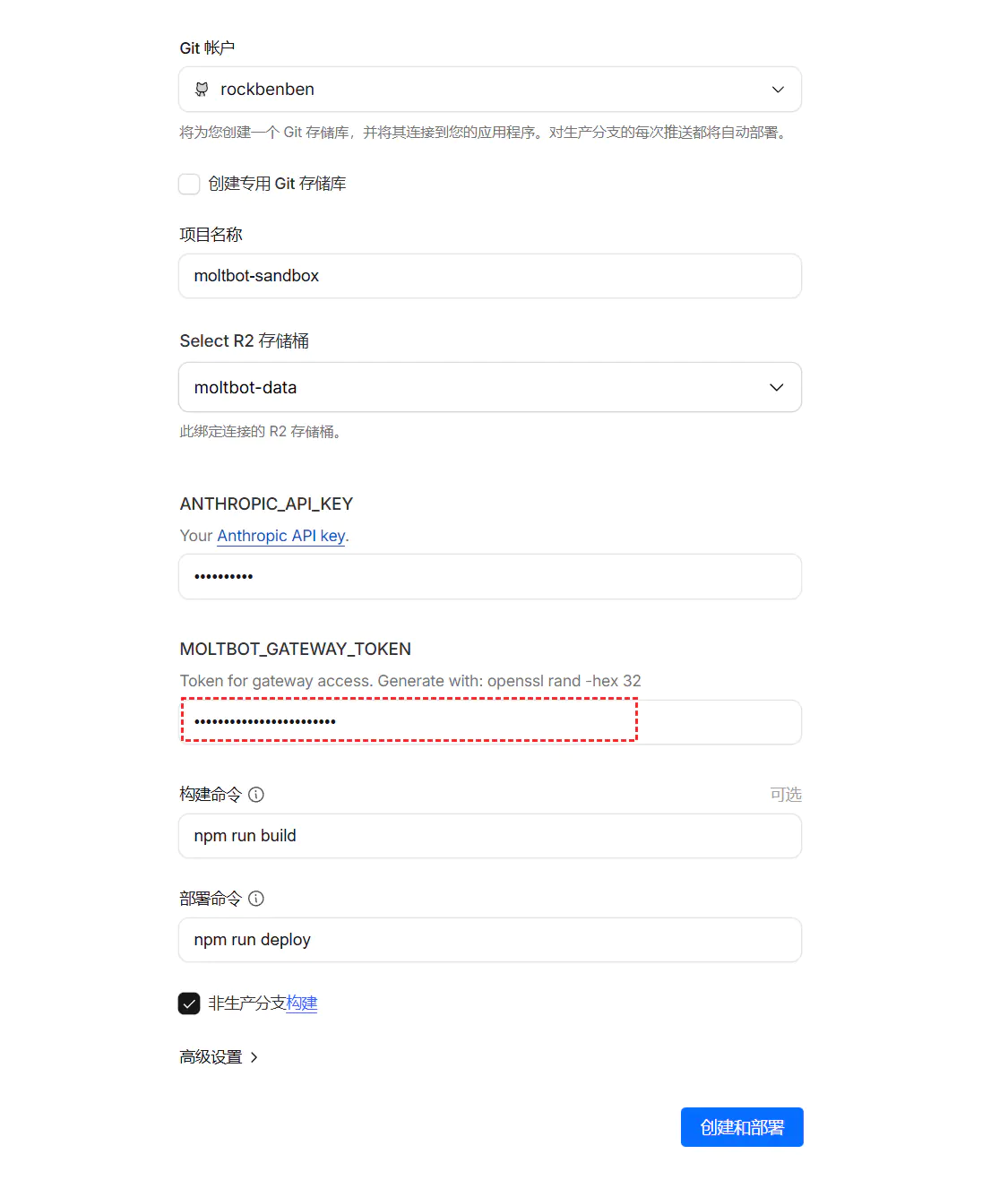
第一步:一键部署 Moltworker
点击部署按钮:
https://deploy.workers.cloudflare.com/?url=https://github.com/cloudflare/moltworker配置 Gateway Token:
- 务必修改并妥善保存
MOLTBOT_GATEWAY_TOKEN - 这是后续进入管理后台的唯一凭证
- 建议使用强密码生成器
- 务必修改并妥善保存
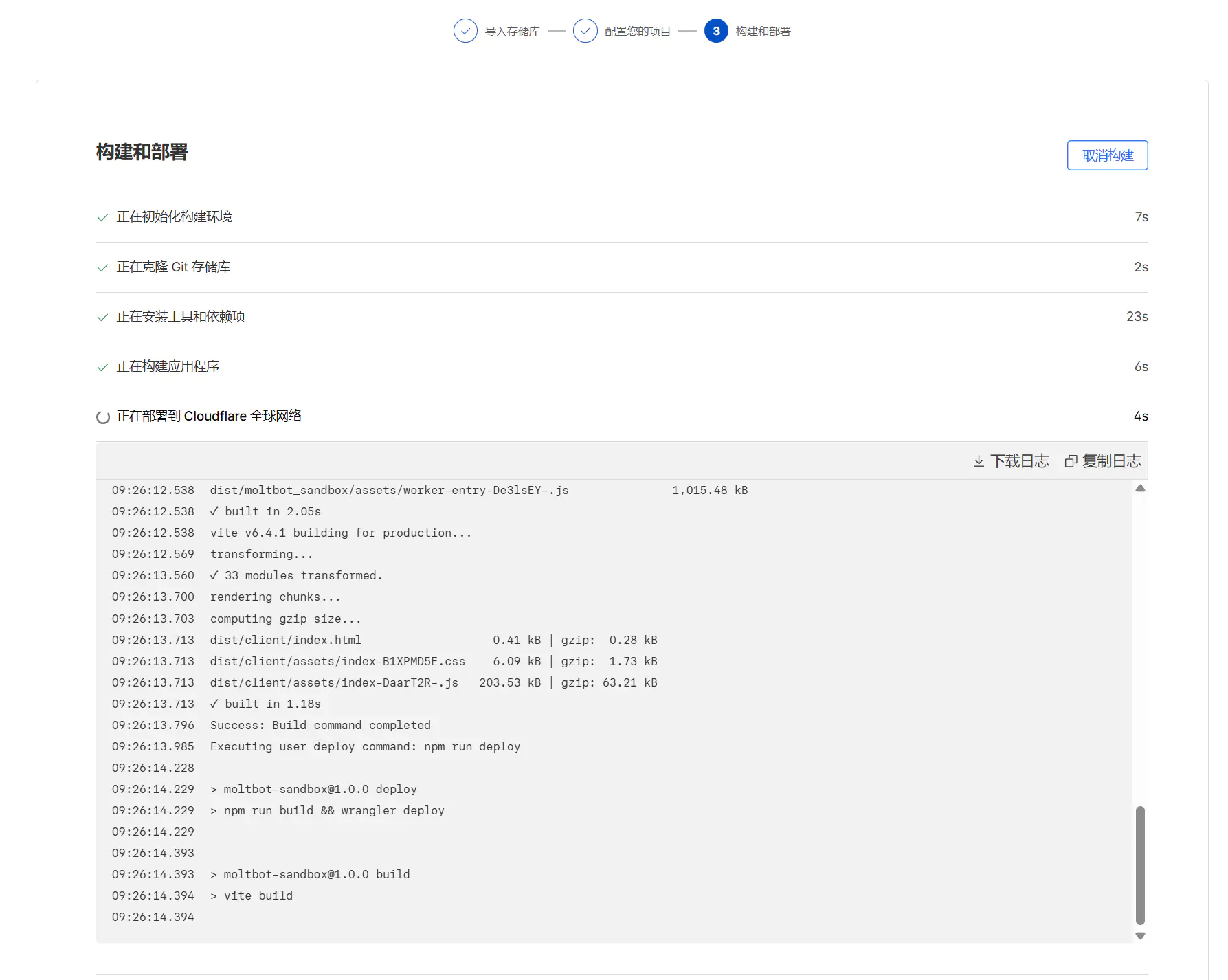
第二步:等待构建
- 部署过程约需 10 分钟
- 可点击「继续处理项目」跳过等待页面
- 构建完成后会自动跳转到项目页面
第三步:配置 Access(Zero Trust)
访问网页界面需要配置 CF_ACCESS_AUD 和 CF_ACCESS_TEAM_DOMAIN 两个变量。
1. 创建应用:
- 进入 Zero Trust → Access → Applications
- 添加一个 Self-hosted 应用
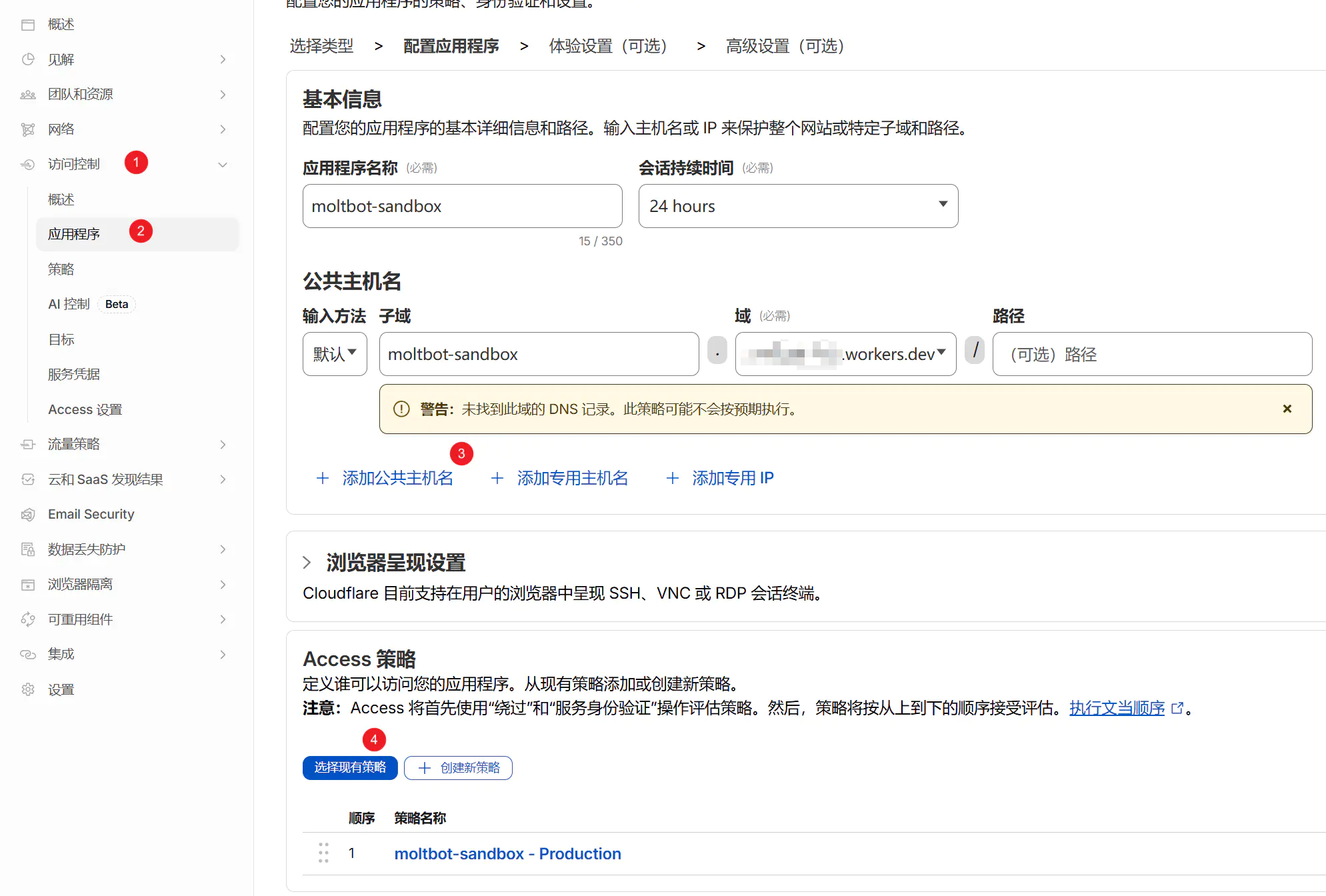
2. 设置域名:
- 子域默认为
moltbot-sandbox - 域名可使用 Cloudflare 分配的 Worker 域名或自定义域名
- Session Duration(会话时间)建议设置长一些,避免频繁登录
3. 配置策略:
- 系统会自动创建
moltbot-sandbox - Production策略 - 默认通过邮箱验证码登录
4. 获取配置变量:
CF_ACCESS_AUD:
- 保存应用后,点击右侧「⋮」编辑
- 在应用程序受众(AUD)标签页找到 Application Audience (AUD)
CF_ACCESS_TEAM_DOMAIN:
- 进入 Zero Trust → Settings
- 团队域名格式:
xxxxxx.cloudflareaccess.com
第四步:配置 R2 对象存储
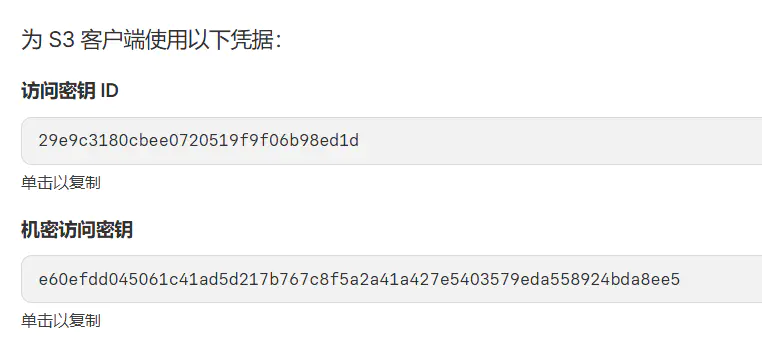
OpenClaw 需要 R2 来存储状态,需配置以下三个变量:
CF_ACCOUNT_IDR2_ACCESS_KEY_IDR2_SECRET_ACCESS_KEY
操作步骤:
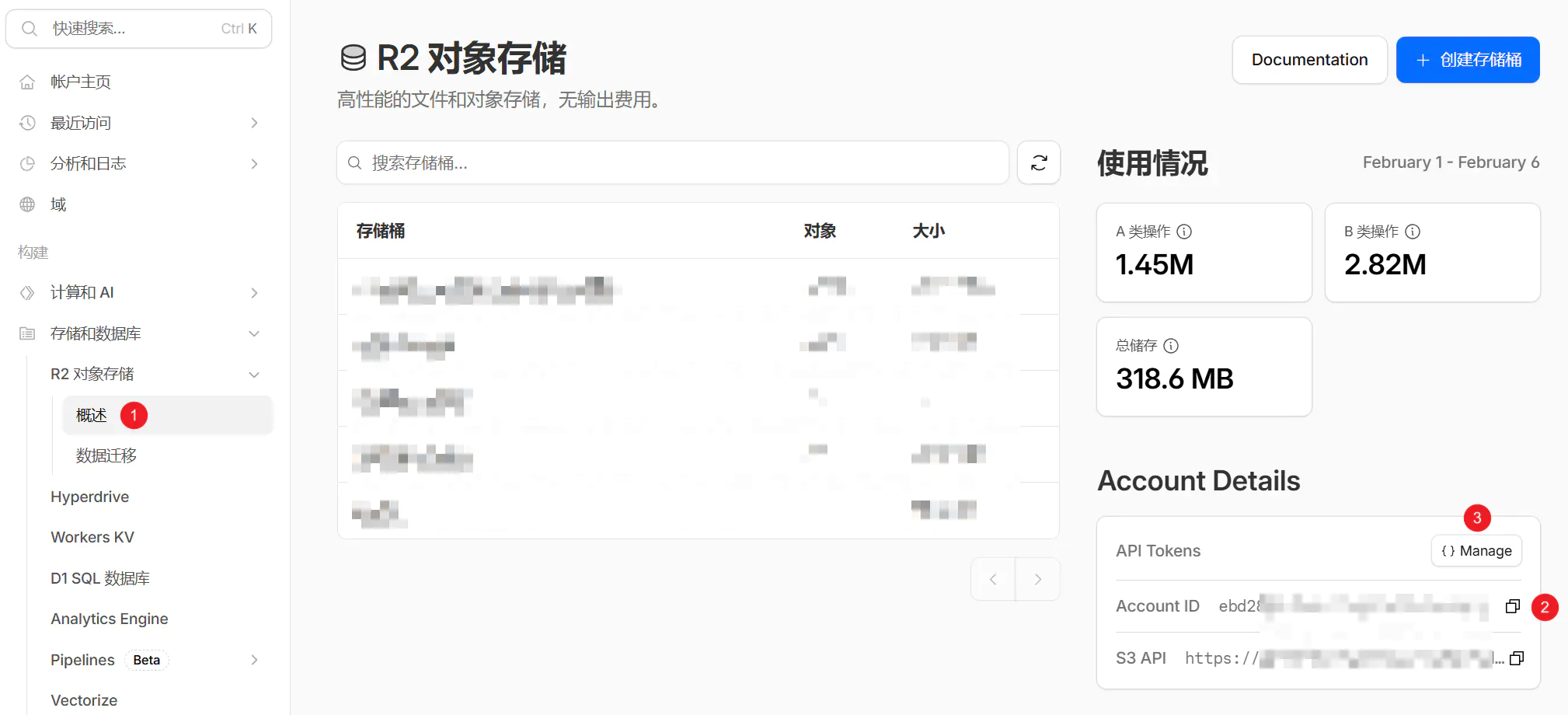
1. 获取 Account ID:
- 在 Cloudflare 侧边栏进入 R2 → Overview
- 右侧 Account Details 中的 Account ID 即为
CF_ACCOUNT_ID
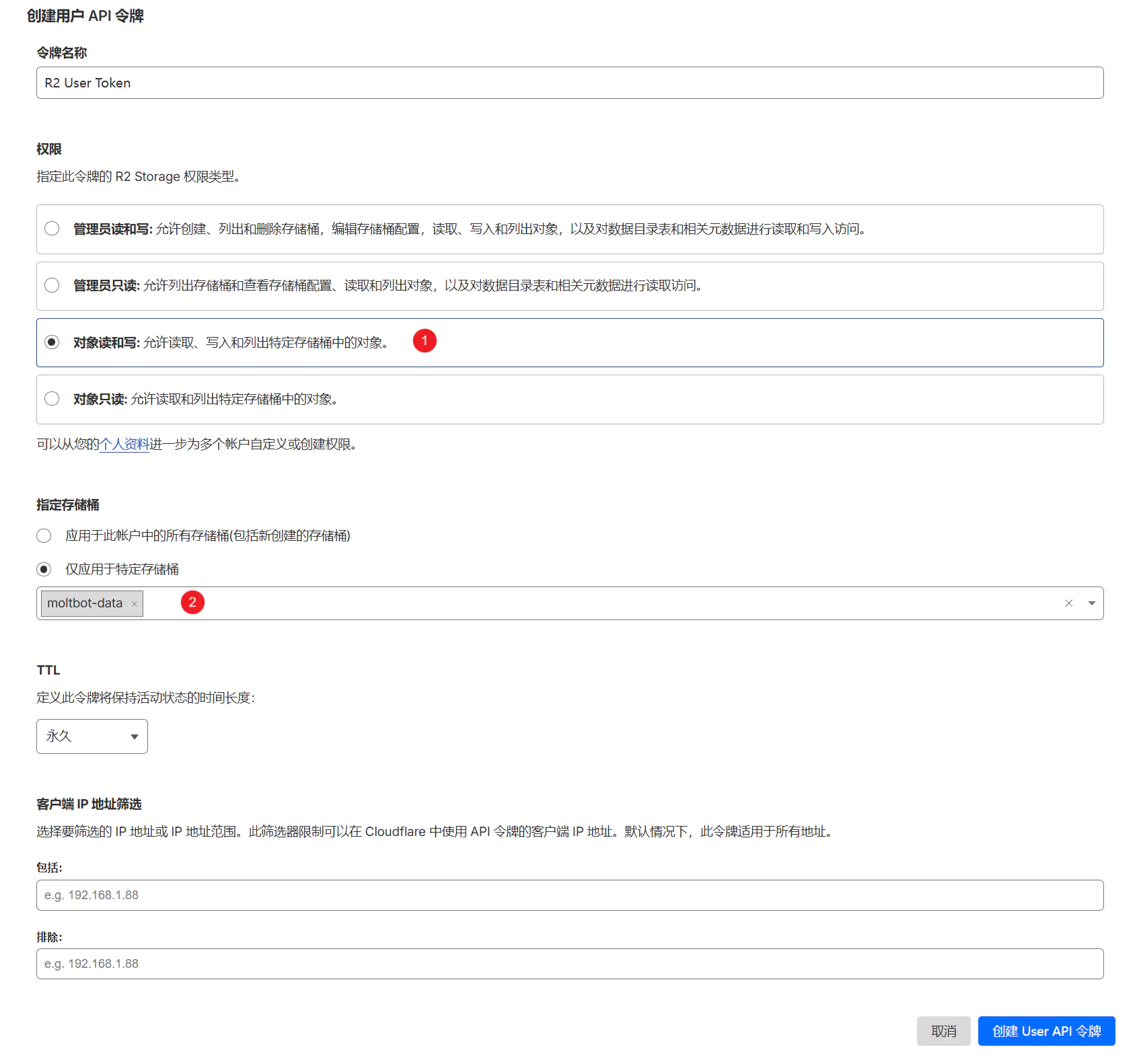
2. 创建 API 令牌:
- 点击 Manage R2 API Tokens
- 选择 Create API Token
3. 设置权限:
- 权限选择 Object Read & Write
- 建议范围通过 Specific Bucket 限制在
moltbot-data
4. 保存密钥:
- 创建成功后,记录 Access Key ID 和 Secret Access Key
⚠️ 重要提示:修改 Token 时请务必核对变量名称。如果不慎修改了 Build Token,会导致 Worker 构建失败。
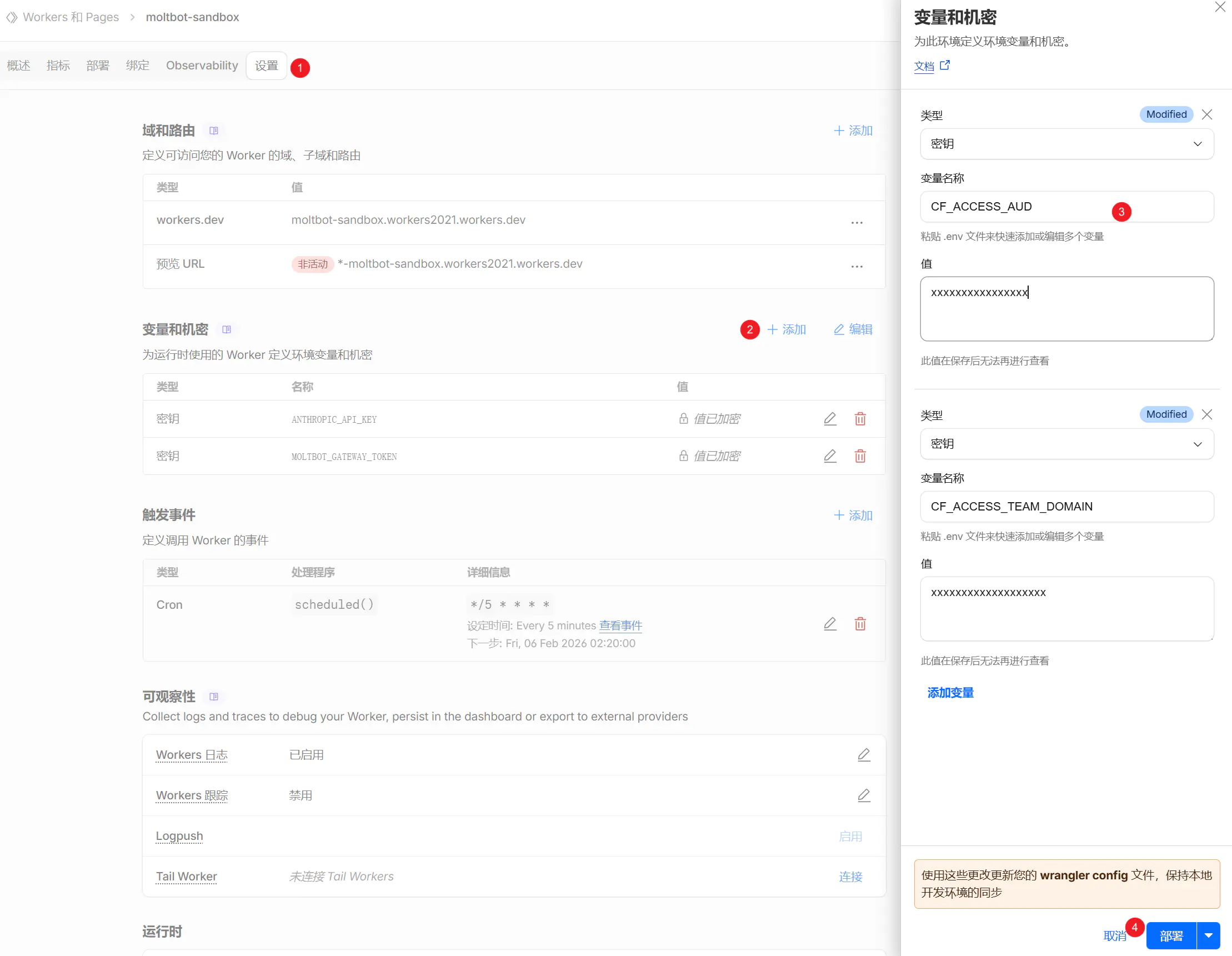
第五步:注入变量并重启
进入设置:
- Workers → Settings → Variables and Secrets
填入变量:
MOLTBOT_GATEWAY_TOKEN(第一步设置的)CF_ACCESS_AUD(第三步获取的)CF_ACCESS_TEAM_DOMAIN(第三步获取的)CF_ACCOUNT_ID(第四步获取的)R2_ACCESS_KEY_ID(第四步获取的)R2_SECRET_ACCESS_KEY(第四步获取的)
重新部署:
- 点击 Deploy 重新部署
- 等待部署完成
访问与管理
部署完成后,可通过以下地址访问:
访问 Worker(需要 token):
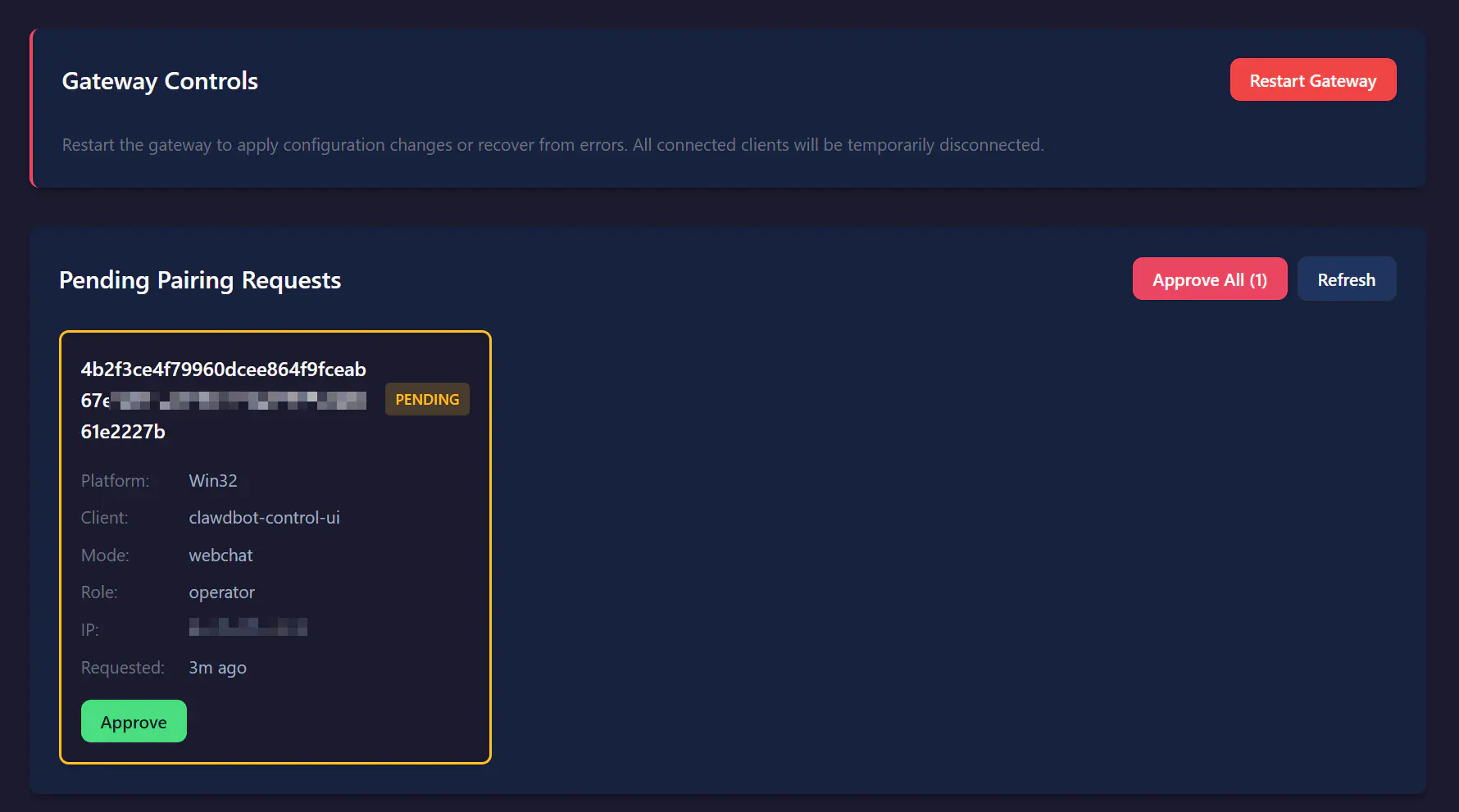
https://moltbot-sandbox.xxxxxxxx.workers.dev?token=MOLTBOT_GATEWAY_TOKEN管理后台(需要邮箱验证):
https://moltbot-sandbox.xxxxxxxx.workers.dev/_admin/通过 Cloudflare Access 的邮箱验证码验证后,即可进入管理后台并接受 Pairing Requests。
基础使用
查看或切换模型
bash
# 查看当前模型
/model

# 切换模型
/model minimax/MiniMax-M2.1设置开机自启命令
为了避免 Worker 重启后模型被重置,建议设置开机自启命令:
bash
set model minimax/MiniMax-M2.1远程终端连接
bash
# 登录到 Gateway
openclaw gateway login --url https://moltbot-sandbox.xxxxxxxx.workers.dev

# 配置 Skills
openclaw configure --section skills避坑指南
问题 1:模型配置报错
症状:通过配置文件修改默认模型后报错
原因:国内 AI 服务商通常区分国内与海外端点,Cloudflare Workers 环境下配置文件修改容易出错
解决方案:
- 直接通过开机命令强制指定模型
- 不要依赖配置文件或后台 UI
- 使用
set model命令设置开机自启
问题 2:Worker 构建失败
症状:部署后 Worker 无法启动
原因:不慎修改了 Build Token
解决方案:
- 检查所有变量名称是否正确
- 确保没有修改 Build Token
- 重新部署
问题 3:无法访问管理后台
症状:访问 /_admin/ 时无法登录
原因:Zero Trust 配置不正确
解决方案:
- 检查
CF_ACCESS_AUD和CF_ACCESS_TEAM_DOMAIN是否正确 - 确认邮箱验证码是否正确
- 检查 Session Duration 设置
成本估算
| 项目 | 费用 | 说明 |
|---|---|---|
| Workers Paid 计划 | 5美元/月 | 基础费用 |
| 额外请求费用 | 按量计费 | 高频使用时产生 |
| R2 存储 | 免费额度内 | 通常不会超出 |
| 总计 | 5-10美元/月 | 取决于使用频率 |
适用场景
推荐使用:
- ✅ 想低成本尝试 OpenClaw
- ✅ 已有 Cloudflare 付费订阅
- ✅ 需要全球 CDN 加速
- ✅ 不想维护服务器
不推荐使用:
- ❌ 期望开箱即用
- ❌ 没有技术背景
- ❌ 需要复杂的自动化流程
- ❌ 预算非常有限
总结
Cloudflare Workers + OpenClaw 是一个低成本的尝鲜方案,适合:
- 未体验过 Agent 自动化,想低成本试手
- 已有 Cloudflare 付费订阅,资源闲置
- 需要全球 CDN 加速的场景
但需要注意:
- OpenClaw 目前还不是一个能「即刻提升效率」的工具
- 更像是一个为 AI 自动化搭建的系统底座
- 如果没有明确的、可标准化的长流程需求,可能只会带来维护成本
下一步:
- 配置 AI 模型(见下文"API配置指南")
- 配置通讯渠道(见第9章:多平台集成)
- 安装 Skills(见第8章:Skills扩展)
Docker 部署(可选)
🐳 开发者选项:Docker 部署适合需要环境隔离的场景。
为什么选择 Docker?
Docker 部署提供环境隔离和便捷管理,如表 2-5 所示。
表 2-5 Docker 部署优势
| 优势 | 说明 |
|---|---|
| 🔒 环境隔离 | 不影响系统环境,干净整洁 |
| 📦 一键部署 | 无需配置依赖,开箱即用 |
| 🔄 易于更新 | 一条命令完成更新 |
| 🌐 跨平台 | Windows/macOS/Linux 统一方案 |
| 🚀 快速启动 | 5分钟完成部署 |
前置要求
安装 Docker:
macOS:
bash
# 下载 Docker Desktop
# 访问:https://www.docker.com/products/docker-desktop

# 或使用 Homebrew
brew install --cask dockerWindows:
bash
# 下载 Docker Desktop
# 访问:https://www.docker.com/products/docker-desktop

# 安装 WSL2(如果还没安装)
wsl --installLinux (Ubuntu):
bash
# 安装 Docker
curl -fsSL https://get.docker.com | sh

# 启动 Docker 服务
sudo systemctl start docker
sudo systemctl enable docker

# 添加当前用户到 docker 组
sudo usermod -aG docker $USER验证安装:
bash
docker --version
# 应显示:Docker version 24.x.x快速开始
方式一:一键脚本部署(推荐新手)
最简单的方式,一条命令搞定所有配置!
bash
curl -fsSL https://clawd.org.cn/install.sh | bash这个脚本会自动:
- ✅ 检查 Docker 环境
- ✅ 下载镜像(使用国内镜像:
jiulingyun803/openclaw-cn:latest) - ✅ 配置环境变量
- ✅ 启动容器
- ✅ 运行配置向导
- ✅ 生成网关令牌
完成后,在浏览器打开 http://127.0.0.1:18789/ 即可使用。
脚本后续操作:
- 按照提示输入渠道信息(可选)
- 将生成的令牌复制到 Web UI 登录
方式二:手动 Docker Compose 部署(适合进阶用户)
如果一键脚本不适用,或需要自定义配置,按以下步骤操作。
步骤 1:创建工作目录
bash
mkdir -p ~/openclaw-docker
cd ~/openclaw-docker步骤 2:创建 .env 环境文件
bash
cat > .env << 'EOF'
# 镜像配置(使用国内镜像)
OPENCLAW_IMAGE=jiulingyun803/openclaw-cn:latest

# 数据目录
OPENCLAW_CONFIG_DIR=./data/.openclaw
OPENCLAW_WORKSPACE_DIR=./data/clawd

# 网关配置
OPENCLAW_GATEWAY_PORT=18789
OPENCLAW_BRIDGE_PORT=18790
OPENCLAW_GATEWAY_BIND=lan
OPENCLAW_GATEWAY_TOKEN=your-secure-token-here

# Claude 集成(可选)
CLAUDE_AI_SESSION_KEY=
CLAUDE_WEB_SESSION_KEY=
CLAUDE_WEB_COOKIE=
EOF步骤 3:创建 docker-compose.yml 文件
yaml
services:
  openclaw-cn-gateway:
    image: ${OPENCLAW_IMAGE:-jiulingyun803/openclaw-cn:latest}
    user: node:node
    environment:
      HOME: /home/node
      TERM: xterm-256color
      OPENCLAW_GATEWAY_TOKEN: ${OPENCLAW_GATEWAY_TOKEN}
      CLAUDE_AI_SESSION_KEY: ${CLAUDE_AI_SESSION_KEY}
      CLAUDE_WEB_SESSION_KEY: ${CLAUDE_WEB_SESSION_KEY}
      CLAUDE_WEB_COOKIE: ${CLAUDE_WEB_COOKIE}
    volumes:
      - ${OPENCLAW_CONFIG_DIR:-./data/.openclaw}:/home/node/.openclaw
      - ${OPENCLAW_WORKSPACE_DIR:-./data/clawd}:/home/node/clawd
    ports:
      - "${OPENCLAW_GATEWAY_PORT:-18789}:18789"
      - "${OPENCLAW_BRIDGE_PORT:-18790}:18790"
    init: true
    restart: unless-stopped
    command:
      [
        "node",
        "dist/index.js",
        "gateway",
        "--bind",
        "${OPENCLAW_GATEWAY_BIND:-lan}",
        "--port",
        "${OPENCLAW_GATEWAY_PORT:-18789}",
      ]

  openclaw-cn-cli:
    image: ${OPENCLAW_IMAGE:-jiulingyun803/openclaw-cn:latest}
    user: node:node
    environment:
      HOME: /home/node
      TERM: xterm-256color
      BROWSER: echo
      CLAUDE_AI_SESSION_KEY: ${CLAUDE_AI_SESSION_KEY}
      CLAUDE_WEB_SESSION_KEY: ${CLAUDE_WEB_SESSION_KEY}
      CLAUDE_WEB_COOKIE: ${CLAUDE_WEB_COOKIE}
    volumes:
      - ${OPENCLAW_CONFIG_DIR:-./data/.openclaw}:/home/node/.openclaw
      - ${OPENCLAW_WORKSPACE_DIR:-./data/clawd}:/home/node/clawd
    stdin_open: true
    tty: true
    init: true
entrypoint: ["node", "dist/index.js"]步骤 4:启动容器
bash
# 拉取最新镜像
docker compose pull

# 启动网关(后台运行)
docker compose up -d openclaw-cn-gateway

# 查看日志(可选)
docker compose logs -f openclaw-cn-gateway步骤 5:运行配置向导
bash
docker compose run --rm openclaw-cn-cli onboard配置向导会提示你:
- 选择网关后端(Claude、Gemini 等)
- 配置 Feishu、Telegram 等渠道
- 生成和保存配置
步骤 6:访问 Web UI
打开浏览器访问:http://127.0.0.1:18789/
将配置向导生成的令牌复制到登录页面即可。
环境变量详解
| 变量 | 含义 | 默认值 | 必需 | 说明 |
|---|---|---|---|---|
| OPENCLAW_IMAGE | Docker 镜像名称 | jiulingyun803/openclaw-cn:latest | ❌ | 使用国内镜像,也可指定版本号 |
| OPENCLAW_CONFIG_DIR | 配置文件目录 | ./data/.openclaw | ❌ | OpenClaw 配置和凭证存储位置 |
| OPENCLAW_WORKSPACE_DIR | 工作空间目录 | ./data/clawd | ❌ | 代理工作文件存储位置 |
| OPENCLAW_GATEWAY_PORT | 网关端口号 | 18789 | ❌ | 访问 Web UI 的端口 |
| OPENCLAW_BRIDGE_PORT | 桥接端口号 | 18790 | ❌ | 用于客户端连接的端口 |
| OPENCLAW_GATEWAY_BIND | 网关绑定地址 | lan | ❌ | localhost(仅本机)/ lan(局域网)/ 0.0.0.0(公网,⚠️ 谨慎使用) |
| OPENCLAW_GATEWAY_TOKEN | 网关认证令牌 | 自动生成 | ❌ | Web UI 登录令牌(可自定义或留空自动生成) |
| CLAUDE_AI_SESSION_KEY | Claude.ai 会话密钥 | 空 | ❌ | ⚠️ 仅使用 Claude AI 作为后端时填写 |
| CLAUDE_WEB_SESSION_KEY | Claude Web 会话密钥 | 空 | ❌ | ⚠️ 仅使用 Claude Web 版时填写 |
| CLAUDE_WEB_COOKIE | Claude Web Cookie | 空 | ❌ | ⚠️ 仅使用 Claude Web 版时填写 |
环境变量设置方式:
方式 A:编辑 .env 文件(推荐)
bash
# 编辑 .env 文件
nano .env

# docker compose 会自动读取
docker compose up -d方式 B:命令行设置
bash
export OPENCLAW_GATEWAY_PORT=18789
docker compose up -d方式 C:命令行临时覆盖
bash
docker compose -e OPENCLAW_GATEWAY_PORT=8080 up -d常用操作
查看网关状态
bash
# 检查容器是否运行
docker compose ps

# 查看网关日志
docker compose logs openclaw-cn-gateway

# 实时查看日志(持续跟踪)
docker compose logs -f openclaw-cn-gateway配置渠道
通过 CLI 容器配置各类渠道:
Telegram(需要机器人令牌):
bash
docker compose run --rm openclaw-cn-cli channels add \
  --channel telegram \
--token "YOUR_BOT_TOKEN"Discord(需要机器人令牌):
bash
docker compose run --rm openclaw-cn-cli channels add \
  --channel discord \
--token "YOUR_BOT_TOKEN"WhatsApp(QR 扫码):
bash
docker compose run --rm openclaw-cn-cli channels loginFeishu(需要 App ID 和 Secret):
bash
docker compose run --rm openclaw-cn-cli onboard
# 按提示输入信息重新配置
bash
# 重新运行配置向导
docker compose run --rm openclaw-cn-cli onboard

# 查看当前配置
docker compose run --rm openclaw-cn-cli config get重启网关
bash
# 重启网关容器
docker compose restart openclaw-cn-gateway

# 停止网关
docker compose down

# 重新启动
docker compose up -d openclaw-cn-gateway更新到最新版本
bash
# 拉取最新镜像
docker compose pull

# 重启容器(自动使用新镜像)
docker compose up -d openclaw-cn-gateway清理数据(谨慎操作)
bash
# 停止并删除容器
docker compose down

# 删除本地数据目录
rm -rf ./data/

# 删除本地镜像(可选)
docker rmi jiulingyun803/openclaw-cn:latest数据持久化
Docker 容器的数据存储在工作目录的 data 文件夹:
bash
~/openclaw-docker/data/
├── .openclaw/         # 配置文件
│   ├── openclaw.json  # 主配置
│   └── logs/          # 日志文件
└── clawd/             # 工作空间
└── workspace/ # 代理工作文件备份数据:
bash
# 备份配置和数据
tar -czf openclaw-backup-$(date +%Y%m%d).tar.gz ./data

# 恢复数据
tar -xzf openclaw-backup-20260210.tar.gzDocker 部署常见问题
问题 1:容器无法启动
症状:docker compose up 后容器立即退出
解决方案:
bash
# 查看详细错误日志
docker compose logs openclaw-cn-gateway

# 检查端口是否被占用
sudo netstat -ltnp | grep 18789
# macOS 使用:lsof -i :18789

# 如果被占用,修改 OPENCLAW_GATEWAY_PORT
# 编辑 .env,将端口改为其他(如 18790)
nano .env问题 2:权限拒绝(Permission Denied)
症状:Error: EACCES: permission denied, mkdir ...
解决方案:
bash
# 确保数据目录存在且权限正确
mkdir -p ./data/.openclaw ./data/clawd
chmod 755 ./data/.openclaw ./data/clawd

# 如果使用了宿主机路径,确保目录可写
chmod 777 ./data问题 3:无法访问 Web UI
症状:浏览器访问 http://127.0.0.1:18789 无响应
解决方案:
bash
# 检查容器是否运行
docker compose ps

# 检查网关日志
docker compose logs openclaw-cn-gateway

# 验证端口是否正确
# 如果 OPENCLAW_GATEWAY_PORT=18789,则访问 :18789
# 如果改了端口,访问对应的新端口

# 检查防火墙设置
# macOS
sudo pfctl -d  # 临时关闭防火墙测试

# Linux
sudo ufw status
sudo ufw allow 18789问题 4:配置向导卡住
症状:docker compose run --rm openclaw-cn-cli onboard 无反应
解决方案:
bash
# 按 Ctrl+C 中断

# 检查网关是否运行
docker compose logs openclaw-cn-gateway

# 重新启动网关并重试
docker compose restart openclaw-cn-gateway
docker compose run --rm openclaw-cn-cli onboard问题 5:镜像拉取失败(403 错误)
症状:docker pull openclaw/openclaw:latest 返回 403 错误
解决方案:
bash
# 使用国内镜像(推荐)
docker pull jiulingyun803/openclaw-cn:latest

# 或在 .env 文件中指定国内镜像
echo "OPENCLAW_IMAGE=jiulingyun803/openclaw-cn:latest" >> .env

# 重新拉取
docker compose pull问题 6:网络超时
症状:拉取镜像或访问 API 时网络超时
解决方案:
bash
# 配置 Docker 镜像加速(国内用户)
# 编辑 Docker 配置
sudo nano /etc/docker/daemon.json

# 添加镜像加速器
{
  "registry-mirrors": [
    "https://docker.mirrors.ustc.edu.cn",
    "https://hub-mirror.c.163.com"
  ]
}

# 重启 Docker
sudo systemctl restart docker

# macOS 用户在 Docker Desktop 设置中添加镜像加速器问题 7:数据丢失
症状:重启容器后配置和数据丢失
解决方案:
bash
# 确保使用了数据卷挂载
# 检查 docker-compose.yml 中的 volumes 配置

# 查看数据是否存在
ls -la ./data/.openclaw
ls -la ./data/clawd

# 如果数据丢失,从备份恢复
tar -xzf openclaw-backup-20260210.tar.gz问题 8:性能问题
症状:容器运行缓慢或占用资源过高
解决方案:
bash
# 限制资源使用(编辑 docker-compose.yml)
services:
  openclaw-cn-gateway:
    # ... 其他配置
    deploy:
      resources:
        limits:
          cpus: '2'
          memory: 2G
        reservations:
          cpus: '1'
          memory: 1G

# 重启容器
docker compose up -d openclaw-cn-gateway从一键脚本迁移到手动配置
如果想从一键脚本切换到手动配置(或反之):
bash
# 停止现有容器
docker compose down

# 备份现有配置
cp -r ~/.openclaw ~/.openclaw.backup

# 更新 .env 和 docker-compose.yml

# 重新启动
docker compose up -d openclaw-cn-gateway配置会自动保留在数据目录中,无需重新设置。
Docker 部署优势总结
✅ 环境隔离:不影响系统环境
✅ 快速部署:5分钟完成
✅ 易于管理:一条命令更新
✅ 跨平台:统一部署方案
✅ 可扩展:支持多实例部署
✅ 国内优化:使用国内镜像,下载速度快
推荐使用场景:
- 开发者本地测试
- 服务器部署
- 多环境隔离
- 快速体验 OpenClaw
下一步:
- 配置 API 模型(见下文"API配置指南")
- 配置通讯渠道(见第9章:多平台集成)
- 安装 Skills(见第8章:Skills扩展)
更新和维护
🔄 保持最新:定期更新 OpenClaw 以获得新功能和安全修复。
检查更新
bash
# 检查当前版本
openclaw --version

# 检查最新版本
curl -s https://api.github.com/repos/openclaw/openclaw/releases/latest | grep tag_name本地安装更新
bash
# 方式一:使用安装脚本
curl -fsSL https://openclaw.ai/install.sh | bash

# 方式二:手动更新
cd ~/openclaw
git pull origin main
pnpm install
pnpm buildDocker 更新
bash
# 拉取最新镜像
docker pull openclaw/openclaw:latest

# 停止并删除旧容器
docker stop openclaw
docker rm openclaw

# 启动新容器
docker run -d \
  --name openclaw \
  -p 18789:18789 \
  -v ~/.openclaw:/root/.openclaw \
  --restart unless-stopped \
openclaw/openclaw:latest备份数据
本地安装备份:
bash
# 备份配置和数据
tar -czf openclaw-backup-$(date +%Y%m%d).tar.gz ~/.openclaw

# 恢复数据
tar -xzf openclaw-backup-20260210.tar.gz -C ~/Docker 备份:
bash
# 备份数据卷
docker run --rm \
  -v ~/.openclaw:/data \
  -v $(pwd):/backup \
  alpine tar czf /backup/openclaw-backup-$(date +%Y%m%d).tar.gz /data

# 恢复数据
docker run --rm \
  -v ~/.openclaw:/data \
  -v $(pwd):/backup \
alpine tar xzf /backup/openclaw-backup-20260210.tar.gz -C /监控和日志
查看日志:
bash
# 本地安装
tail -f ~/.openclaw/logs/gateway.log

# Docker
docker logs -f openclaw监控指标:
bash
# 查看系统状态
openclaw gateway status

# 查看资源使用
openclaw stats

# 查看 API 消耗
openclaw stats api故障排查
常见问题:
Gateway 无法启动
bash# 查看日志 openclaw logs # 检查端口占用 lsof -i :18789 # 重启 Gateway openclaw gateway restartAPI 连接失败
bash# 测试 API 连接 openclaw test api # 检查 API Key openclaw config get models.providers性能问题
bash# 清理缓存 openclaw cache clear # 重启服务 openclaw gateway restart
卸载
本地安装卸载:
bash
# 停止服务
openclaw gateway stop

# 删除文件
rm -rf ~/.openclaw
rm -rf ~/openclaw

# 删除命令
npm uninstall -g openclawDocker 卸载:
bash
# 停止并删除容器
docker stop openclaw
docker rm openclaw

# 删除镜像
docker rmi openclaw/openclaw

# 删除数据
rm -rf ~/.openclawAPI配置指南
OpenClaw需要连接AI模型才能工作,推荐使用国产大模型,性价比高。
为什么需要API?
OpenClaw本身不包含AI模型,需要连接第三方API:
- 官方API:价格贵、国内访问困难
- 第三方API:价格便宜、国内直连
API模型分类
OpenClaw支持两种类型的API模型配置:
1. 内置 API 模型(推荐新手)
什么是内置API模型?
OpenClaw已经预先配置好了多个主流AI模型的连接方式,你只需要:
- ✅ 获取API Key
- ✅ 在配置向导中选择对应模型
- ✅ 粘贴API Key即可使用
支持的内置模型:
OpenClaw内置支持非常多的API模型,包括但不限于:

国内模型(推荐):
- 🌙 Moonshot AI (Kimi):长文本专家,200万字上下文
- 🧠 DeepSeek:性价比之王,推理能力强
- 🎯 智谱GLM:中文理解好,多模态支持
- 🚀 通义千问 (Qwen):阿里出品,稳定可靠
- 🎨 MiniMax:对话自然,创意能力强
- 📚 百度文心:中文语料丰富
- 🔥 字节豆包:性价比高
国外模型:
- 🤖 OpenAI (GPT-4/GPT-3.5):最强大但价格贵
- 🦙 Anthropic (Claude):推理能力强,安全性高
- 🔷 Google (Gemini):多模态能力强
- 🌐 Groq:推理速度快
优势:
- ✅ 配置简单,无需手动编写配置文件
- ✅ 参数已优化,开箱即用
- ✅ 自动更新,跟随OpenClaw版本
- ✅ 适合新手,降低使用门槛
使用场景:
- 🎯 新手用户快速上手
- 🎯 使用主流大模型
- 🎯 不想折腾配置文件
2. 自定义 API(进阶用户)
什么是自定义API?
如果你想使用:
- 🔧 OpenClaw未内置的模型
- 🔧 自己搭建的模型服务
- 🔧 第三方API代理服务
- 🔧 企业内部的模型接口
就需要使用自定义API配置。
配置方式:
需要手动编辑配置文件 ~/.openclaw/openclaw.json,指定:
baseUrl:API服务地址apiKey:认证密钥api:API协议类型(如openai-chat、anthropic-messages)models:模型列表和参数
优势:
- ✅ 灵活性高,支持任何兼容的API
- ✅ 可以使用小众模型
- ✅ 可以自定义模型参数
- ✅ 适合企业定制化需求
劣势:
- ⚠️ 配置复杂,需要了解JSON格式
- ⚠️ 需要手动维护配置
- ⚠️ 参数错误可能导致无法使用
使用场景:
- 🎯 进阶用户
- 🎯 使用非主流模型
- 🎯 企业内部部署
- 🎯 需要精细控制参数
配置方式对比
两种配置方式的对比如表 2-6 所示。
表 2-6 API 配置方式对比
| 特性 | 内置API模型 | 自定义API |
|---|---|---|
| 配置难度 | ⭐ 简单 | ⭐⭐⭐⭐ 复杂 |
| 适用人群 | 新手 | 进阶用户 |
| 模型选择 | 主流模型 | 任意模型 |
| 配置方式 | 向导选择 | 手动编辑 |
| 维护成本 | 低 | 高 |
| 灵活性 | 中 | 高 |
推荐配置路径
新手推荐:
1. 使用内置API模型
2. 选择国产模型(如 Kimi、DeepSeek)
3. 通过 openclaw onboard 向导配置
4. 先体验,熟悉后再考虑自定义进阶用户:
1. 先用内置API模型熟悉OpenClaw
2. 了解配置文件结构
3. 根据需求添加自定义API
4. 测试验证后投入使用自定义API配置(进阶用户)
⚠️ 适合人群:进阶用户、需要使用非主流模型、企业定制化需求
什么时候需要自定义API?
如果你遇到以下情况,需要使用自定义API配置:
使用非内置模型:
- OpenClaw未内置的小众模型
- 新发布的模型(OpenClaw还未更新)
- 区域限定的模型
使用第三方代理:
- API代理服务(如 OpenRouter、API2D)
- 企业内部的API网关
- 自建的模型服务
精细控制参数:
- 自定义模型参数
- 调整上下文窗口大小
- 修改默认配置
配置文件位置
📖 详细说明: 完整的配置文件结构和使用指南请参考 配置文件结构完整指南
bash
# 配置文件路径
~/.openclaw/openclaw.json

# 编辑配置文件
nano ~/.openclaw/openclaw.json配置文件结构
json
{
  "models": {
    "mode": "merge",
    "providers": {
      "你的供应商名称": {
        "baseUrl": "API服务地址",
        "apiKey": "你的API 密钥",
        "auth": "认证方式",
        "api": "API协议类型",
        "models": [
          {
            "id": "模型ID",
            "name": "模型显示名称",
            "contextWindow": 上下文窗口大小,
            "maxTokens": 最大输出tokens
          }
        ]
      }
    }
  },
  "agents": {
    "defaults": {
      "model": {
        "primary": "供应商名称/模型ID"
      }
    }
  }
}示例1:配置DeepSeek(自定义方式)
json
{
  "models": {
    "mode": "merge",
    "providers": {
      "deepseek": {
        "baseUrl": "https://api.deepseek.com",
        "apiKey": "sk-你的API 密钥",
        "auth": "api-key",
        "api": "openai-chat",
        "models": [
          {
            "id": "deepseek-chat",
            "name": "DeepSeek Chat",
            "contextWindow": 64000,
            "maxTokens": 4096
          },
          {
            "id": "deepseek-coder",
            "name": "DeepSeek Coder",
            "contextWindow": 64000,
            "maxTokens": 4096
          }
        ]
      }
    }
  },
  "agents": {
    "defaults": {
      "model": {
        "primary": "deepseek/deepseek-chat"
      }
    }
  }
}示例2:配置第三方API代理
如果你使用API代理服务(如OpenRouter),配置如下:
json
{
  "models": {
    "mode": "merge",
    "providers": {
      "openrouter": {
        "baseUrl": "https://openrouter.ai/api/v1",
        "apiKey": "sk-or-v1-你的密钥",
        "auth": "api-key",
        "api": "openai-chat",
        "models": [
          {
            "id": "anthropic/claude-3.5-sonnet",
            "name": "Claude 3.5 Sonnet",
            "contextWindow": 200000,
            "maxTokens": 8192
          },
          {
            "id": "openai/gpt-4",
            "name": "GPT-4",
            "contextWindow": 128000,
            "maxTokens": 4096
          }
        ]
      }
    }
  },
  "agents": {
    "defaults": {
      "model": {
        "primary": "openrouter/anthropic/claude-3.5-sonnet"
      }
    }
  }
}示例3:配置多个模型供应商
你可以同时配置多个供应商,根据需要切换:
json
{
  "models": {
    "mode": "merge",
    "providers": {
      "deepseek": {
        "baseUrl": "https://api.deepseek.com",
        "apiKey": "sk-你的DeepSeek密钥",
        "auth": "api-key",
        "api": "openai-chat",
        "models": [
          {
            "id": "deepseek-chat",
            "name": "DeepSeek Chat",
            "contextWindow": 64000,
            "maxTokens": 4096
          }
        ]
      },
      "moonshot": {
        "baseUrl": "https://api.moonshot.cn/v1",
        "apiKey": "sk-你的Kimi密钥",
        "auth": "api-key",
        "api": "openai-chat",
        "models": [
          {
            "id": "moonshot-v1-128k",
            "name": "Kimi 128K",
            "contextWindow": 128000,
            "maxTokens": 4096
          }
        ]
      }
    }
  },
  "agents": {
    "defaults": {
      "model": {
        "primary": "deepseek/deepseek-chat",
        "fallback": "moonshot/moonshot-v1-128k"
      }
    }
  }
}配置参数说明
| 参数 | 说明 | 示例 |
|---|---|---|
baseUrl | API服务地址 | https://api.deepseek.com |
apiKey | API 密钥 | sk-xxx |
auth | 认证方式 | api-key 或 bearer |
api | API协议 | openai-chat、anthropic-messages |
id | 模型ID | deepseek-chat |
name | 显示名称 | DeepSeek Chat |
contextWindow | 上下文窗口 | 64000 |
maxTokens | 最大输出 | 4096 |
常见API协议类型
openai-chat:OpenAI兼容接口(最常用)anthropic-messages:Anthropic Claude接口google-generative-ai:Google Gemini接口azure-openai:Azure OpenAI接口
配置后重启服务
bash
# 方式1:重启Gateway
openclaw gateway restart

# 方式2:停止后重新启动
systemctl --user stop openclaw-gateway.service
systemctl --user start openclaw-gateway.service

# 方式3:完全重启
systemctl --user restart openclaw-gateway.service验证配置
bash
# 查看当前配置的模型
openclaw models list

# 测试模型连接
openclaw models test deepseek/deepseek-chat常见问题
Q1:配置后无法连接?
检查项:
✅ baseUrl是否正确
✅ apiKey是否有效
✅ 网络是否能访问API地址
✅ 配置文件JSON格式是否正确Q2:如何切换模型?
bash
# 临时切换
openclaw agent --message --model deepseek/deepseek-chat

# 永久切换:修改配置文件中的 primary 字段Q3:如何添加多个模型?
在 models 数组中添加多个模型对象即可
每个模型需要有唯一的 id内置API模型配置(推荐新手)
💡 适合人群:新手用户、想要快速上手的用户
以下是几个常用的内置API模型配置教程,选择一个你喜欢的即可。
1. Kimi 2.5 配置(推荐)
特点:
- 📚 超长上下文:支持200万字
- 📄 长文档处理:论文、报告分析专家
- 🎯 中文理解好:适合中文场景
- 💰 套餐划算:重度使用建议购买套餐
配置步骤:
第一步:访问Kimi Code平台

第二步:购买套餐(可选)
💡 提示:OpenClaw消耗token较大,建议购买套餐更划算。
推荐套餐:
- Allegretto套餐:适合日常使用
- 按需选择其他套餐
第三步:创建API Key
- 打开控制台
- 创建API Key
- 名称随便取

第四步:保存API Key
⚠️ 重要:这个API Key一定要复制并保存!点击"完成"后就无法再查看了。

第五步:配置到OpenClaw
bash
# 运行配置向导
openclaw onboard

# 配置流程:
# 1. 选择 QuickStart
# 2. 选择模型供应商:Moonshot AI
# 3. 粘贴刚才复制的API Key
# 4. 选择默认模型:kimi-code/kimi-for-codi
# 5. 完成其他配置成本估算:
- 轻度使用:10-20元/月
- 中度使用:30-50元/月
- 重度使用:建议购买套餐
2. DeepSeek 配置(性价比之王)
特点:
- 💰 最便宜:输入0.001元/千tokens
- 🧠 推理能力强:适合复杂任务
- 💻 编程能力出色:代码生成质量高
配置步骤:
第一步:注册并充值
访问:https://platform.deepseek.com/
⚠️ 注意:DeepSeek采用按量付费,账户余额必须大于0才能调用API。
第二步:充值账户
建议先充值10元试用:
第三步:创建API Key
- 保证账号有余额
- 点击"API keys"
- 点击"创建API key"

第四步:保存API Key
⚠️ 重要:API Key只显示一次,务必复制保存!
名称随便取,复制API Key后妥善保存。

第五步:配置到OpenClaw
bash
# 运行配置向导
openclaw onboard

# 配置流程:
# 1. 选择 QuickStart
# 2. 选择模型供应商:DeepSeek
# 3. 粘贴API Key
# 4. 选择默认模型:deepseek-chat
# 5. 完成其他配置成本估算:
- 日常使用:5-10元/月
- 中度使用:10-30元/月
- 重度使用:30-50元/月
国产大模型配置(其他选项)
1. DeepSeek配置(性价比之王)
特点:
- 💰 最便宜:输入0.001元/千tokens
- 🧠 推理能力强:适合复杂任务
- 💻 编程能力出色:代码生成质量高
DeepSeek 的 API 调用是按量付费的,你的账户余额必须大于 0 才能正常调用接口。
如果账户没钱或余额不足,API 请求会直接失败,所以提前充值是保证服务可用的必要操作。
其他大模型也是同理,你要去找到对应网址去充值,然后获取API keys
如果你只想先试试,可以就先花个10块钱玩一下

保证账号有余额之后,点击”API keys“,然后点”创建 API key“

API key的名称:随便取。然后这个APIkey一定!一定!要复制下来,因为一般你点完”关闭“之后,你就再也无法查看你的API key了,如果你我忘记了你的API key,那只能重新创建一个了。
复制完后,找地方先存起来,后续在”第四步:OpenClaw 配置“的时候会用到
好,至此”第二步:配置模型“完成,进入”第三步:配置Bot“吧
配置步骤:
注册账号:
访问:https://platform.deepseek.com/ 注册并登录获取API Key:
进入"API管理" 点击"创建API Key" 复制API Key(格式:sk-xxx)配置到OpenClaw:
bash# 编辑配置文件 nano ~/.openclaw/openclaw.json添加配置:
json{ "models": { "mode": "merge", "providers": { "deepseek": { "baseUrl": "https://api.deepseek.com", "apiKey": "sk-你的API 密钥", "auth": "api-key", "api": "openai-chat", "models": [ { "id": "deepseek-chat", "name": "DeepSeek Chat", "contextWindow": 64000, "maxTokens": 4096 } ] } } }, "agents": { "defaults": { "model": { "primary": "deepseek/deepseek-chat" } } } }重启Gateway:
bashopenclaw gateway restart
成本估算:
- 日常使用:5-10元/月
- 中度使用:10-30元/月
- 重度使用:30-50元/月
2. Kimi配置(长文本专家)
特点:
- 📚 超长上下文:支持200万字
- 📄 长文档处理:论文、报告分析专家
- 🎯 中文理解好:适合中文场景
那如何使用,第一步,搜索 kimi code:https://www.kimi.com/code
第二步,购买优惠套餐 plan,说实话,目前 OpenClaw 消耗 token 还挺大的,最好买个套餐划算一些,我买的是 Allegretto 套餐。

第二步,打开控制台,创建 API key。名字随便取。
这个APIkey一定!一定!要复制下来,因为一般你点完”完成“之后,你就再也无法查看你的API key了,如果你忘记了你的API key,那就只能重新创建一个了。复制完后,找地方先存起来,后续在”第四步:OpenClaw 配置“的时候会用到
配置步骤:
注册账号:
访问:https://platform.moonshot.cn/ 注册并登录获取API Key:
进入"API管理" 点击"创建API Key" 复制API Key配置到OpenClaw:
json{ "models": { "mode": "merge", "providers": { "moonshot": { "baseUrl": "https://api.moonshot.cn/v1", "apiKey": "sk-你的API 密钥", "auth": "api-key", "api": "openai-chat", "models": [ { "id": "moonshot-v1-8k", "name": "Kimi k2.5", "contextWindow": 8000, "maxTokens": 4096 } ] } } }, "agents": { "defaults": { "model": { "primary": "moonshot/moonshot-v1-8k" } } } }
成本估算:
- 日常使用:10-20元/月
- 中度使用:20-50元/月
- 重度使用:50-100元/月
3. 其他国产大模型
| 模型 | 特点 | 价格 | 官网 |
|---|---|---|---|
| GLM-4 | 多模态能力强 | 中等 | https://open.bigmodel.cn/ |
| 文心一言 | 百度生态 | 中高 | https://cloud.baidu.com/ |
| 通义千问 | 阿里生态 | 中等 | https://dashscope.aliyun.com/ |
国际模型配置(可选)
如果需要使用Claude、GPT等国际模型:
- 直接使用官方API(需要魔法)
- 使用第三方API服务(国内直连)
推荐第三方API:
- 价格便宜50%-70%
- 国内直连,无需魔法
- 支持支付宝、微信支付
成本对比
| 模型 | 输入价格 | 输出价格 | 月费用估算 |
|---|---|---|---|
| DeepSeek | 0.001元/千tokens | 0.002元/千tokens | 5-30元 |
| Kimi | 0.012元/千tokens | 0.012元/千tokens | 10-50元 |
| GLM-4 | 0.005元/千tokens | 0.005元/千tokens | 10-40元 |
| Claude(第三方) | 0.015元/千tokens | 0.075元/千tokens | 50-200元 |
| GPT-4(第三方) | 0.03元/千tokens | 0.06元/千tokens | 100-300元 |
💡 省钱技巧:
- 日常对话用DeepSeek(最便宜)
- 长文档用Kimi(长上下文)
- 复杂任务用Claude(质量最高)
常见问题解决
安装问题
Q1: Node.js版本不对
bash
# 检查版本
node --version

# 如果低于22,升级
nvm install 22
nvm use 22Q2: 权限错误
bash
# macOS/Linux
sudo chown -R $USER ~/.openclaw

# Windows
# 以管理员身份运行PowerShellQ3: 网络连接失败
- 检查网络连接
- 尝试使用代理
- 或使用云端部署
API配置问题
Q1: API Key无效
- 检查是否完整复制(包括sk-前缀)
- 检查是否有多余空格
- 检查账户余额是否充足
Q2: 模型不可用
- 检查模型ID是否正确
- 检查API服务是否正常
- 尝试切换其他模型
Q3: Token消耗太快
- 使用更便宜的模型(DeepSeek)
- 优化提示词
- 定期清理会话历史
Gateway问题
Q1: Gateway无法启动
bash
# 查看日志
tail -f ~/.openclaw/logs/gateway.log

# 重启Gateway
openclaw gateway restartQ2: 端口被占用
bash
# 查看端口占用
lsof -i :18789

# 修改端口
openclaw config set gateway.port 187902.X 版本升级指南
🔄 保持最新:定期升级OpenClaw以获得新功能、性能优化和安全修复。
⚠️ 重要提示:目前推荐使用 2026.3.2 版本。2026.2.12 版本存在已知 bug(Issue #15141),会导致 heartbeat 和消息处理功能异常。
推荐版本
当前推荐版本:2026.3.2
已知问题版本:
- ❌ 2026.2.12:Session 路径验证 bug,影响 heartbeat 和 Telegram/飞书消息处理
为什么要升级?
OpenClaw持续迭代更新,升级可以获得:
- ✅ 新功能和改进
- ✅ 性能优化
- ✅ 安全修复
- ✅ Bug修复
- ✅ 更好的兼容性
检查当前版本
bash
# 查看当前版本
openclaw --version

# 查看配置文件版本
cat ~/.openclaw/openclaw.json | grep version如果配置文件版本比当前版本新,说明需要升级。
升级方式选择
根据你的安装方式选择对应的升级方法:
| 安装方式 | 升级方法 | 难度 | 推荐度 |
|---|---|---|---|
| 云端部署 | 重新部署镜像 | ⭐ | ⭐⭐⭐⭐⭐ |
| Docker | 拉取新镜像 | ⭐⭐ | ⭐⭐⭐⭐⭐ |
| 本地安装(npm) | npm升级 | ⭐⭐⭐ | ⭐⭐⭐⭐ |
| 本地安装(源码) | git pull | ⭐⭐⭐⭐ | ⭐⭐⭐ |
方式一:npm直接升级(推荐)
这是最可靠的升级方式,适用于通过npm安装的用户。
升级步骤
第一步:备份配置
bash
# 备份整个配置目录
cp -r ~/.openclaw ~/.openclaw.backup-$(date +%Y%m%d)

# 验证备份
ls -la ~/.openclaw.backup-*第二步:停止Gateway服务
bash
# 停止Gateway
openclaw gateway stop

# 验证已停止
openclaw gateway status第三步:卸载旧版本
bash
# 卸载旧版本
npm uninstall -g openclaw

# 验证卸载
which openclaw # 应该没有输出第四步:安装新版本
bash
# 安装推荐版本 2026.3.2(需要使用--force参数)
npm install -g openclaw@2026.3.2 --force⚠️ 版本选择说明:
- 推荐安装 2026.3.2 版本(稳定)
- 避免安装 2026.2.12 版本(存在 session 路径 bug)
- 如果需要最新功能,等待 2026.2.13+ 版本修复后再升级
⚠️ 为什么需要--force?
npm会检测到已存在的文件,使用--force强制覆盖。
第五步:修复配置
bash
# 运行doctor工具自动修复配置
openclaw doctor --fixdoctor工具会自动:
- 更新Gateway服务入口点路径
- 检查配置兼容性
- 修复已知问题
- 重新安装LaunchAgent(macOS)或systemd服务(Linux)
第六步:重启Gateway
bash
# 重启Gateway
openclaw gateway restart

# 等待几秒后检查状态
sleep 5
openclaw gateway status第七步:验证升级
bash
# 检查版本
openclaw --version

# 检查Gateway状态
openclaw gateway status

# 测试连接
openclaw channels status成功的输出应该显示:
2026.3.2

Runtime: running (pid xxxxx, state active)
RPC probe: ok
Listening: *:18789
Dashboard: http://127.0.0.1:18789/升级示例
以下是一次真实的升级过程:

图:升级前版本检查,配置文件版本(2026.2.6-3)比当前版本(2026.2.1-zh.3)新

图:使用npm install --force安装新版本

图:升级完成,版本更新到2026.3.2
方式二:官方脚本升级
使用官方提供的一键升级脚本。
bash
# 运行升级脚本
curl -fsSL https://openclaw.ai/install.sh | bash优点:
- ✅ 一键完成
- ✅ 自动处理依赖
缺点:
- ❌ 可能遇到npm错误
- ❌ 不如方式一可靠
如果遇到错误:
- 切换到方式一(npm直接升级)
- 或查看下文的故障排查
方式三:Docker升级
如果使用Docker部署,升级非常简单。
bash
# 停止并删除旧容器
docker compose down

# 拉取最新镜像
docker compose pull

# 启动新容器
docker compose up -d openclaw-cn-gateway

# 查看日志
docker compose logs -f openclaw-cn-gateway方式四:云端部署升级
腾讯云Lighthouse
- 进入轻量应用服务器控制台
- 选择你的OpenClaw实例
- 点击"重置应用"
- 选择最新的OpenClaw镜像
- 等待重置完成
- 重新配置API(配置会保留)
升级后的变化
配置文件自动迁移
升级后,doctor工具会自动:
- 更新配置文件格式
- 迁移旧版本配置
- 创建备份文件:
~/.openclaw/openclaw.json.bak
服务管理改进
macOS:
- LaunchAgent自动重新安装
- 服务路径更新为新版本
- 日志位置:
~/.openclaw/logs/gateway.log
Linux:
- systemd服务自动更新
- 服务路径更新为新版本
- 日志位置:
~/.openclaw/logs/gateway.log
已知警告
升级后可能看到一些警告,这些通常不影响使用:
Config warnings:
- plugins.entries.feishu: plugin feishu: duplicate plugin id detected说明:这是一个已知的插件重复警告,不影响正常使用。
升级故障排查
问题1:npm install报错EEXIST
症状:
npm error code EEXIST
npm error path /usr/local/bin/openclaw
npm error EEXIST: file already exists解决方案:
bash
# 使用--force参数强制覆盖
npm install -g openclaw@2026.3.2 --force问题2:Gateway启动失败
症状:
Gateway not running解决方案:
bash
# 运行doctor修复
openclaw doctor --fix

# 重启Gateway
openclaw gateway restart

# 查看详细日志
tail -f ~/.openclaw/logs/gateway.log问题3:配置文件版本不匹配
症状:
Config was last written by a newer OpenClaw (2026.2.6-3);
current version is 2026.2.1-zh.3解决方案:
bash
# 升级到推荐版本 2026.3.2
npm install -g openclaw@2026.3.2 --force
openclaw doctor --fix问题4:插件加载失败
症状:
plugin not found: xxx解决方案:
bash
# 重新安装插件
openclaw plugins install <plugin-name>

# 或禁用有问题的插件
openclaw config set plugins.allow []问题5:端口被占用
症状:
Error: listen EADDRINUSE: address already in use :::18789解决方案:
bash
# 查找占用端口的进程
lsof -i :18789

# 停止旧的Gateway进程
kill -9 <PID>

# 或修改端口
openclaw config set gateway.port 18790
openclaw gateway restart回滚到旧版本
如果升级后遇到问题,可以回滚到旧版本。
方式一:从备份恢复
bash
# 停止Gateway
openclaw gateway stop

# 恢复配置
cp -r ~/.openclaw.backup-20260213/* ~/.openclaw/

# 降级到旧版本(以中文版为例)
npm uninstall -g openclaw
npm install -g @qingchencloud/openclaw-zh@2026.2.1-zh.3 --force

# 重启Gateway
openclaw gateway restart方式二:安装指定版本
bash
# 查看可用版本
npm view openclaw versions

# 安装指定版本
npm install -g openclaw@2026.2.8 --force

# 修复配置
openclaw doctor --fix

# 重启Gateway
openclaw gateway restart升级最佳实践
升级前必做
备份配置:
bashcp -r ~/.openclaw ~/.openclaw.backup-$(date +%Y%m%d)记录当前版本:
bashopenclaw --version > ~/openclaw-version-before-upgrade.txt导出重要配置:
bashopenclaw config get > ~/openclaw-config-backup.json检查磁盘空间:
bashdf -h ~
升级时注意
使用--force参数:
bashnpm install -g openclaw@2026.3.2 --force运行doctor修复:
bashopenclaw doctor --fix检查Gateway状态:
bashopenclaw gateway status查看日志:
bashtail -f ~/.openclaw/logs/gateway.log
升级后验证
检查版本号:
bashopenclaw --version测试Gateway连接:
bashopenclaw channels status验证插件功能:
bashopenclaw plugins list测试频道连接:
- 发送测试消息
- 验证AI回复
- 检查Skills功能
检查API消耗:
bashopenclaw stats api
已知问题版本警告
2026.2.12 版本问题
不推荐使用 2026.2.12 版本,该版本存在严重 bug:
问题描述:
- Session 文件路径验证逻辑错误
- 导致 heartbeat 功能失败
- 导致 Telegram/飞书消息处理异常
- 错误信息:
Session file path must be within sessions directory
影响范围:
- ❌ Heartbeat 功能完全不可用
- ❌ Telegram bot 无法响应消息
- ❌ 飞书 bot 可能无法正常回复
- ✅ 网页版不受影响
官方 Issue:
- Issue #15141
- 状态:已确认,等待修复
解决方案:
- 不要升级到 2026.2.12
- 如果已升级,回退到 2026.3.2:bash
openclaw gateway stop
npm uninstall -g openclaw
npm install -g openclaw@2026.3.2 --force
openclaw doctor --fix
openclaw gateway restart
推荐做法:
- 使用 2026.3.2 版本(当前最稳定)
- 等待 2026.2.13+ 版本修复后再升级
- 关注官方 GitHub Issues 获取最新信息
升级时间建议
推荐升级时机:
- 🌙 晚上或周末(使用量低)
- 📅 每月检查一次更新
- 🐛 发现Bug时及时升级
- 🔒 安全更新立即升级
不推荐升级时机:
- ❌ 工作日高峰期
- ❌ 重要任务进行中
- ❌ 网络不稳定时
- ❌ 没有备份时
自动更新(可选)
如果想自动检查更新,可以设置定时任务。
macOS/Linux:
bash
# 编辑crontab
crontab -e

# 添加每周检查更新(周日凌晨2点)
0 2 * * 0 /usr/local/bin/openclaw doctor --check-updatesWindows: 使用任务计划程序创建定时任务。
版本发布说明
查看每个版本的更新内容:
bash
# 访问GitHub发布页面
https://github.com/openclaw/openclaw/releases

# 或使用命令行
curl -s https://api.github.com/repos/openclaw/openclaw/releases/latest升级成本估算
| 升级方式 | 时间成本 | 风险等级 | 推荐度 |
|---|---|---|---|
| npm直接升级 | 5-10分钟 | 低 | ⭐⭐⭐⭐⭐ |
| 官方脚本 | 3-5分钟 | 中 | ⭐⭐⭐⭐ |
| Docker | 2-3分钟 | 低 | ⭐⭐⭐⭐⭐ |
| 云端重置 | 5-10分钟 | 中 | ⭐⭐⭐ |
升级检查清单
升级前:
- 备份配置目录
- 记录当前版本
- 检查磁盘空间
- 选择合适的升级时间
升级中:
- 停止Gateway服务
- 卸载旧版本
- 安装新版本(使用--force)
- 运行doctor修复
- 重启Gateway
升级后:
- 验证版本号
- 测试Gateway连接
- 验证插件功能
- 测试频道连接
- 检查日志无错误
升级支持
如果升级遇到问题:
查看日志:
bashtail -f ~/.openclaw/logs/gateway.log运行诊断:
bashopenclaw doctor查看官方文档:
https://docs.openclaw.ai/加入社区:
- GitHub Issues
- Discord社区
- 飞书群组
升级案例:2026.2.1-zh.3 → 2026.3.2
以下是一次真实的升级案例,供参考。
升级背景:
- 原版本:2026.2.1-zh.3(中文版)
- 目标版本:2026.3.2(推荐稳定版)
- 升级原因:获取新功能和性能优化
升级过程:
备份配置:
bashcp -r ~/.openclaw ~/.openclaw.backup-20260213停止Gateway:
bashopenclaw gateway stop卸载旧版本:
bashnpm uninstall -g openclaw安装新版本:
bashnpm install -g openclaw@2026.3.2 --force修复配置:
bashopenclaw doctor --fix重启Gateway:
bashopenclaw gateway restart验证升级:
bashopenclaw --version # 显示:2026.3.2 openclaw gateway status # 显示:running
升级结果:
- ✅ 升级成功
- ✅ 配置自动迁移
- ✅ Gateway运行正常
- ✅ 所有功能正常
遇到的问题:
- npm install报错EEXIST → 使用--force解决
总耗时:约5分钟
本章小结
通过本章,你应该已经:
✅ 了解了云端部署和本地部署的区别
✅ 完成了OpenClaw的安装(云端或本地)
✅ 配置了API(推荐国产大模型)
✅ 验证了安装是否成功
✅ 学会了如何升级OpenClaw
实战练习
- 完成OpenClaw安装(云端或本地)
- 配置至少一个API(推荐DeepSeek或Kimi)
- 发送第一条测试消息
- 验证AI是否正常回复
- 检查当前版本,如有更新可尝试升级
下一章:第3章:快速上手 - 开始使用 OpenClaw
返回目录:README